Aztec Guzzler Operator Manual
OWNER’S MANUAL
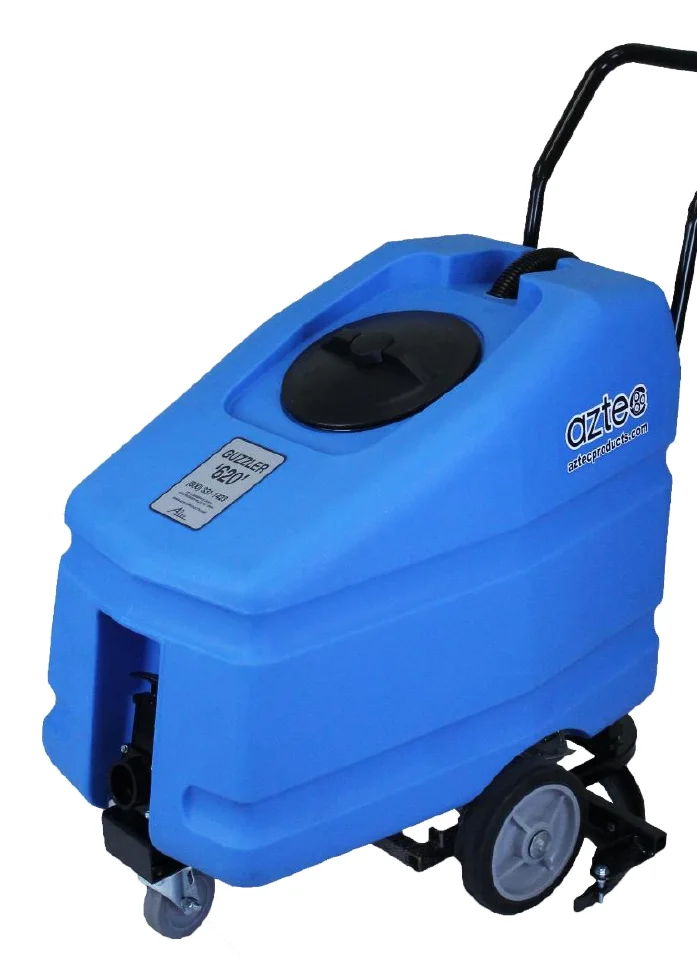
THE GUZZLER
High Speed Solution Retriever
WWW.AZTECPRODUCTS.COM
CALL 215-393-4700 TOLL FREE: 800-331-1423
201 COMMERCE DRIVE, MONTGOMERYVILLE, PA 18936
11-2025
TABLE OF CONTENTS
| Section | Page |
|---|---|
| INTRODUCTION | PG 3 |
| SAFETY MESSAGES | PG 4 |
| IMPORTANT SAFETY INFORMATION | PG 4 |
| RECEIVING THE GUZZLER | PG 4 |
| GUZZLER SET UP | PG 4 |
| HANDLE MOUNTING INSTRUCTIONS | PG 5 |
| GUZZLER OPERATION | PG 6 |
| GUZZLER CLEAN UP | PG 7 |
| TRANSPORTING THE GUZZLER | PG 7 |
| STORING THE GUZZLER | PG 7 |
| GUZZLER MAINTENANCE | PG 8 |
| TROUBLESHOOTING AND NOTES | PG 9 |
| REPLACEMENT PARTS AND DIAGRAMS: | |
| GUZZLER UNDERSIDE PARTS | PG 10 |
| GENERAL GUZZLER PARTS | PG 11 |
| RETURN GOODS POLICY | PG 12 |
| GUZZLER WARRANTY | PG 13 |
| RETAILER / DISTRIBUTOR CONTACT INFO | PG 13 |
INTRODUCTION
Thank you for purchasing this Aztec Products, Inc. machine. You have purchased a quality product and we welcome you to the Aztec family. It is critically important to utilize proper training, understanding, maintenance and care for this product. For best results from your Aztec machine, you must read and understand this Owner’s Manual, and follow all operation guidelines and safety messages. Protect your WARRANTY by following all maintenance guidelines and keeping a dated log. If a problem should arise, consult an authorized Aztec service center.
All information in this Owner’s Manual is up to date and based on the latest product information available at the time of printing. Aztec Products, Inc. reserves the right to make changes at any time without notice or incurring obligation. Visit the website for an updated Owner’s Manual: www.aztecproducts.com.
This Owner’s Manual and the maintenance log must be kept as a permanent part of the machine and remain with the machine if resold.
This manual is designed to make your job easier. However, there is nothing more important than the safety aids and instructions that are found throughout this document. User experience provides the best feedback. We welcome your comments and suggestions.
This manual should be kept available to all operating and maintenance personnel. No part of this document may be copied or reproduced without written permission.
SAFETY MESSAGES
Your safety and the safety of others is very important. As the manufacturer, we have provided important safety messages throughout this manual and on the machine. The purpose of these safety messages is to prevent damage to you, your machine, the property, and/or the environment.
Please read and understand this information thoroughly. A safety message alerts you to potential hazards that could result in injury or death, and/or cause damage to the floor and/or facility. Each safety message is preceded by a universal safety alert symbol (!) and one of these safety words: DANGER, WARNING, CAUTION, or NOTICE. These signal words mean:

IMPORTANT SAFETY INFORMATION
The Guzzler is the ultimate in high-speed recovery of scrubbing and stripping solutions. The Guzzler’s 30” squeegee path retrieves solution at a rate of up to 30,000 sqft/hour. That’s TWICE the speed of the other conventional recovery methods and will not create additional foaming. The Guzzler is the “Step Three” of the Aztec WorkSmart Sidewinder Stripping System, which includes the Liquidator (strip solution applicator), the Sidewinder (propane floor stripper), and the Grand Finale (finish applicator).
Recommended surfaces for the Guzzler include:
- Vinyl and ceramic tile
- Sealed or finished concrete floors
- Wood, stone and terrazzo
The Guzzler is not recommended for any other use. Contact us: parts@aztecproducts.com for additional application questions, or to order replacement parts.
All of Aztec’s machines proudly MADE IN THE USA.
RECEIVING THE GUZZLER
- Inspect for obvious shipping damage or missing parts.
- Chassis – pump plate, squeegee, and wheel condition.
- Parts – handle hardware is in parts bag located inside solution tank.
- Any damage or missing parts must be reported to Aztec Products within seven working days of receiving the equipment.
GUZZLER SETUP
Mount Handle Assembly
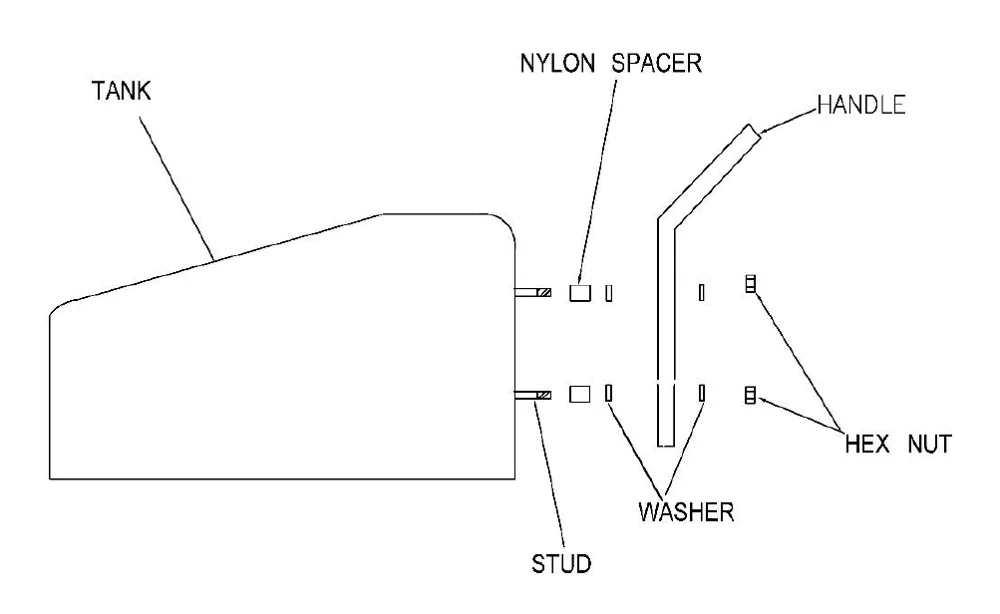
HANDLE MOUNTING INSTRUCTIONS
- INSERT (4) STUDS INTO STEEL INSERTS ON BACK OF TANK. HAND TIGHTEN ONLY.
- INSTALL (1) NYLON SPACER ON EACH STUD, THEN (1) STEEL WASHER ON EACH STUD.
- INSTALL HANDLE ONTO STUDS, THEN INSTALL OTHER WASHERS ONTO STUDS.
- INSTALL HEX NUT ON EACH STUD AND TIGHTEN.
- MOUNT HANDLE, RE-INSTALL WASDHER, THEN NUT AND TIGHTEN
GUZZLER OPERATION
- Press down on the foot bar and lift on handle until chassis is locked down into the operating position. Do not press the foot pedal located on the right side of the foot bar.
- Push the machine a few feet forward until squeegee is laid out. A side to side motion will help squeegee to lay out.
- A normal walking speed assures nominal performance. The faster you go, the better the machine works. If the pump stops working, see TROUBLESHOOTING on pg 8. When foam escapes through breather hole in lid, tank is full (35 gallons) and must be emptied. See GUZZLER CLEAN UP below.
- When completed, return the chassis to the transport position by stepping on the foot pedal located on the right side of the foot bar. The 1/4 cup of liquid residue is easily mopped up.
If the floor is not being wiped dry, the squeegee may need adjustment. See TROUBLESHOOTING on pg 8.
GUZZLER CLEAN UP
- Drain the tank — locate discharge valve at the front of tank. Position for proper draining. Lift “T” handle to regulate solution discharge. Tip machine forward for complete drainage. Take care not to damage squeegee when draining.
- Rinse the tank with water.
- Remove hose from the top of the pump to drain solution that is past the pump.
- To tilt machine, rest the unit on the foot bar and handle. This will expose the undercarriage for cleaning.
- Rinse wheels, chassis, and squeegee.
- Drain pump by gently pressing on the inlet flapper valve located in the center of the pump plate.
- Flushing pump: hold a hose next to the inlet flapper valve while simultaneously activating the pump by turning a drive wheel. Be sure to drain excess solution from pump.
- Re-install hose to pump.
TRANSPORTING THE GUZZLER
The Guzzler should be transported with the front swivel caster on the ground. The chassis should be in the “up” or transport position. When moving from site to site, DO NOT drag squeegee across parking lots or thresholds.
STORING THE GUZZLER
It is very important to drain all liquid from the unit if it is to be stored or transported in freezing conditions.
GUZZLER MAINTENANCE
SQUEEGEE ADJUSTMENT
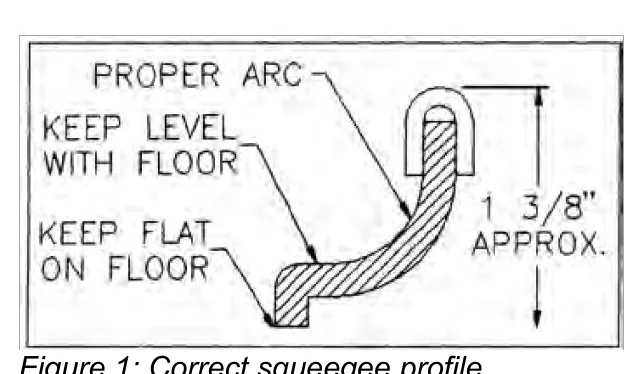
To adjust the squeegee, the three (3) bolts which attach the squeegee will also adjust the squeegee height. Turn the bolts clockwise (to raise) or counter clockwise (to lower). A 1/2 turn should be enough. Be sure jam nuts are snug. Check performance and adjust accordingly. See Figure 1 below.
PUMP SERVICE
Cleaning Pump — Remove pump. Wash in warm water. Make sure that all debris is cleared from inlet and outlet flapper valves. Check for worn parts.
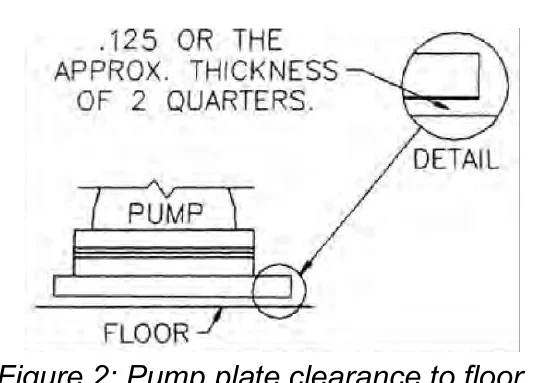
Adjusting Pump Plate — Loosen four nuts holding pump and adjust so black plate is 1/8" from the floor. Check for wear on foot pedal. See Figure 2 below.
Rebuilding Pump — Remove pump. Replace inlet, outlet and then diaphragm components of the pump. Only tighten screws until tan hinge gasket starts to squeeze out. Check pump for suction before re-installing.
REPAIRING LEAKS
Isolate leak:
Fitting Leak — Remove fitting, clean and smooth the surface and/or gasket. Apply silicon and re-install.
Body Leak — Contact Aztec Products, manufacturer.
TROUBLESHOOTING
Problem: NOT LEAVING FLOOR DRY
Solution: Remove debris collected between the floor and the squeegee. Put debris in tank. Wipe squeegee of any debris. Adjust squeegee up or down to obtain optimum performance. See MAINTENANCE on pg 7. If streaking continues check for nicks and/or tears in the squeegee.
Problem: NOT PICKING UP LIQUID
Solution: Re-prime pump by holding hand over pump hose while pushing the machine forward quickly. If still no suction, check inlet and outlet flapper valves for debris. To check outlet flapper remove the return tube bellow. If no debris found, the pump is worn or has not been cleaned properly. See PUMP SERVICE on pg 7.
Problem: LEAKS
Solution: See REPAIRING LEAKS section on pg 7.
NOTES
RETURN GOODS POLICY
The design and construction of this product are both innovative and unique. In order to troubleshoot our equipment, we rely heavily on returned defective or failed parts so that we can examine the causes of failure. While this may at first seem to be an inconvenience, ultimately you benefit from safer, better designed machine components. Please give us the opportunity to serve you better by following these RGA (Return Goods Authorization) rules.
- We maintain the serial number, date of shipment or sale, and customer name on each piece of equipment sold. If you were the purchaser, please reference that information on your request for replacement or repair. If you purchased the equipment through a dealer, please include the company name, the date, and the serial number of the product.
- Ask for an RGA number when you are ordering the replacement part. Return the failed part within 14 days, freight prepaid, exactly as it was at the time of failure. Our inspection and evaluation will attempt to determine the probable cause of failure.
- If our inspection reveals that the failed part was defective, we will credit your account for the entire amount of the part including your cost of return freight, but not packaging expense. When incomplete parts are returned for credit, their condition or state of incompletion will be assessed against the credit claim.
- We will not accept freight collect returns or returns that do not indicate the RGA # on the packing list.
Your satisfaction is extremely important to us. We intend to be reasonable on any matter that is related to our warranty service or other wear-related problems which our customers feel need attention. Please help us to help you. Before assuming that a part is defective, check the repair manual to see if the problem might be something that you or one of your employees might be capable of correcting. If it is not, follow the above policy and depend on us to respond quickly and responsibly.
AZTEC GUZZLER LIMITED ONE YEAR WARRANTY
Aztec Products, Inc. warrants its products to be free from defects in material and workmanship for a period of one year from the date of sale.
Aztec Products, Inc. agrees at its option to repair or replace at its own expense any product or part(s) which examination proves to be defective in workmanship or materials provided that the purchaser notifies Aztec Products, Inc. directly, within the warranty period, and follows the Return Policy.
This warranty does not apply to or cover equipment damaged by misuse, abuse, neglect, accident, or any use not specified in the instruction manual, or any other circumstances that are out of the control of Aztec Products, Inc. or their authorized agents.
All repairs or changes must be made under the supervision or arrangement of Aztec Products, Inc. or their agents unless prior written consent has been issued. Any deviation from this arrangement shall make the owner of the equipment and/or party involved in those changes responsible for any and all damage resulting from such changes.
The foregoing is the entire and only Aztec Products, Inc. warranty which in no event covers incidental or consequential damage resulting from any such defective product or part(s). This warranty gives specific legal rights. Purchaser may have other rights which vary from state to state.
This warranty is non-transferable.
AZTEC PRODUCTS, INC • www.aztecprocucts.com
201 Commerce Drive • Montgomeryville, PA 18936 • 215-393-4700
To order replacement parts, email parts@aztecproducts.com
RETAILER/DISTRIBUTOR CONTACT INFO
PURCHASE DATE:
DISTRIBUTOR NAME:
DISTRIBUTOR PHONE NUMBER(S):
NOTES:
Aztec is a trademark of Aztec Products, Inc. Southeastern Equipment & Supply is an independent dealer.