Minuteman E17 / E20 / H20 Traction Drive Operator Manual
User Manual
Minuteman® E17/E20/H20 Walk-Behind Scrubber, Disc Traction Drive
Document 988721UM, Rev E 07/16.
Preface
This manual is furnished with each new MINUTEMAN® E17/E20/H20. This provides the necessary operating and preventive maintenance instructions. Operators must read and understand this manual before operating or servicing this machine.
This machine was designed to give you excellent performance and efficiency. For best results and minimal cost, please follow the general guidelines below:
- Operate the machine with reasonable care.
- Follow the manufacturer’s suggested maintenance instructions as provided in this booklet.
- Use original Minuteman® supplied parts.
Technical specifications
Model: E17/E20/H20 Traction Drive. All models beginning with: E17TD / E20DTD / H20DTD.
| E17TD | E20DTD / H20DTD | |
|---|---|---|
| Current (Max) | 38 amps | 40 amps |
| Battery Capacity (Lead Acid) | 140Ah @20 hr | 140Ah @20 hr |
| Battery Capacity (Gel) | 95Ah @20 hr | 95Ah @20 hr |
| Sound Level | 69 dBA | 69 dBA / 65.5 dBA |
| Cleaning path width | 17 in (43 cm) | 20 in (51 cm) |
| Squeegee width | 30 in (76 cm) | 34 in (86 cm) |
| Productivity (Traction Drive) | 23,188 ft²/hr (2,154 m²) | 27,280 ft²/hr (2,534 m²) |
| Working speed (Traction Drive) | 3.1 mph (5 km per hr) | 3.1 mph (5 km per hr) |
| Transport Speed | 3 mph (4.8 km per hr) | 3 mph (4.8 km per hr) |
| Rated voltage | 24 volts | 24 volts |
| Vacuum flow | 65 cfm (110 m³/hr) | 65 cfm (110 m3/hr) |
| Vacuum waterlift | 45 inches (112 mbar) | 45 inches (112 mbar) / 46 inches (115 mbar) |
| Vacuum power | .60 HP (450 W) | .60 HP (450 W) |
| Brush type | Disc | Disc |
| Brush motor(s) power | 3/4 HP (560 W) | 3/4 HP (560 W) |
| Number of brushes | 1 | 1 |
| Brush RPM | 180 RPM | 180 RPM |
| Aqua-Stop equipped | Available | Available |
| Solution capacity | 12 Gal (45 liters) | 12 Gal (45 liters) |
| Recovery capacity | 13 Gal (49 liters) | 13 Gal (49 liters) |
| Working Grade | 2% | 2% |
| Weight with batteries | 365 lbs (166 kg) | 372 lbs (169 kg) |
| Weight without batteries | 231 lbs (105 kg) | 238 lbs (108 kg) |
| Dimensions (LxWxH) | 44.4 x 18.8 x 42.3 in (112.8 x 47.8 x 107.4 cm) | 47.4 x 21.3 x 42.3 in (120.4 x 54.1 x 107.4 cm) |
| Drive Motor Power | 1/5 HP (150 W) | 1/5 HP (150 W) |
Battery options
| Part Number | Type | Mfg’r | Capacity | |
|---|---|---|---|---|
| Ah | @ hrs | |||
| 956140 | Lead Acid | Crown | 140 | 20 |
| 956100 | Sealed | Crown | 95 | 20 |
| 956753 | Lead Acid | Trojan | 130 | 20 |
Corrected obvious misprints: the E17TD solution capacity was printed as “12 AGal” (now 12 Gal, as for the E20DTD / H20DTD on this page), and the E20DTD / H20DTD dimensions were printed without an “x” between 54.1 and 107.4 cm (now “54.1 x 107.4 cm”, as in the E17TD column).
Table of contents
Page numbers are PDF page numbers, which match the numbers printed on the pages of this manual.
- Preface (page 2)
- Technical Specifications (page 3)
- Table of Contents (page 4)
- Notes (page 5)
- Safety Instructions (page 6)
- Unpacking Instructions (page 7)
- Machine Overview (page 8)
- Control Panel (page 10)
- Control functions (bail handle, switches, levers, gauges) (page 11)
- Circuit Breakers (page 12)
- Battery Compartment (page 12)
- Diagnostic Code Guide (page 13)
- Optional Hour Meter (page 13)
- Rear Squeegee (page 14)
- Handle Adjustment (page 17)
- Aqua-Saver Solution Control (page 19)
- Solution Tank Drain Hose (page 20)
- Solution Level Indicator (page 20)
- Solution Fill Filter (page 21)
- Screened Float (page 22)
- Recovery Tank Drain Hose (page 23)
- Deck Skirt Removal (page 23)
- In-Line Solution Filter Assembly (page 24)
- The E17/E20/H20 (page 25)
- Machine Operation (page 26)
- To Charge Batteries (page 27)
- Loading Brush (page 28)
- Unloading Brush (page 29)
- Care - After Use (page 30)
- Maintenance (page 31)
- Troubleshooting (page 32)
- Fault / Diagnostic Codes (page 34)
- CE Declaration of Conformity (page 36)
- Warranty (page 38)
Notes
This page is intentionally left blank.
Safety instructions
Important safety instructions
The following information below may cause a potential hazard to the operator and equipment. Read this manual carefully and be aware when these conditions can exist. Take necessary steps to locate all safety devices on the machine and train the personnel operating the machine. Report any machine damage or faulty operation immediately. Do not use machine if it is not in proper operating condition.
For safety during operation
For safety when servicing or maintaining machine
SAVE THESE INSTRUCTIONS
Unpacking instructions
Inspection
Carefully unpack and inspect your E17/E20/H20 Walk-Behind Scrubber for shipping damage. Follow unpacking instructions on shipping pallet. Each unit has been tested and thoroughly inspected before shipment. Any damage is the responsibility of the delivery carrier who should be notified immediately.
Electrical
This machine is battery operated and designed to operate on 24 volts DC (2) 12-volt batteries.
Batteries
We do not recommend mixing AMP hour capacities. Alternate battery sets can be used if they equal physical size and capacity. If alternate battery sets are used please contact Minuteman for on board charger settings.
Operator responsibility
Read this manual carefully before operating this machine.
The operator is responsible for taking care of the daily maintenance and check ups of the machine to keep it in good working condition. The operator must inform the service mechanic or supervisor when the scheduled maintenance intervals are required as stated in the MAINTENANCE section of this manual.
Before starting familiarize yourself with the machine and its controls (see “Machine Overview, Front”, “Machine Overview, Rear”, “Control Console” diagrams).
Machine overview: front
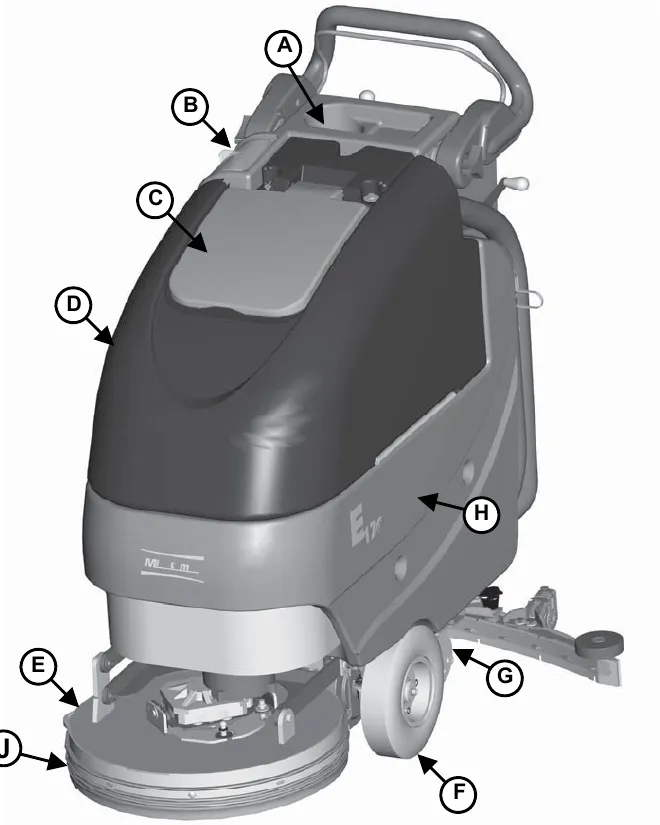
| Key | Item |
|---|---|
| A | Spray bottle / cup holder |
| B | Solution fill port |
| C | Recovery tank lid |
| D | Recovery tank |
| E | Brush deck |
| F | Front wheel |
| G | Rear caster |
| H | Solution tank |
| J | Floating deck skirt |
Machine overview: rear
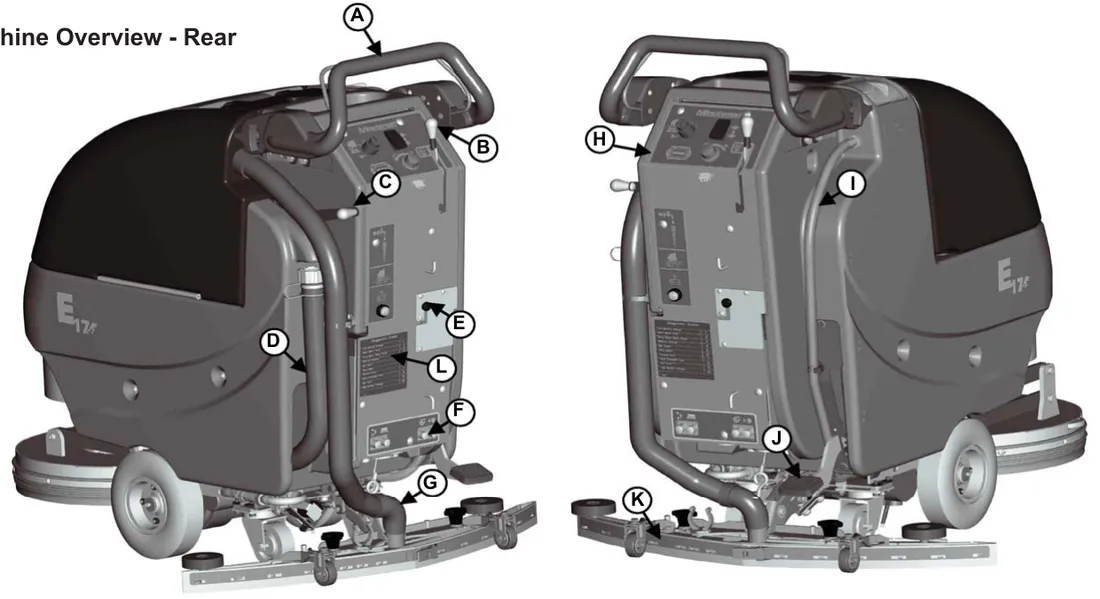
| Key | Item |
|---|---|
| A | Bail handle |
| B | Squeegee lift lever |
| C | Solution control lever |
| D | Recovery tank drain hose |
| E | Onboard charger cord |
| F | Circuit breakers |
| G | Recovery hose |
| H | Control panel |
| I | Solution tank drain hose / level indicator |
| J | Brush lift pedal |
| K | Rear squeegee |
| L | Diagnostic code guide |
Control panel
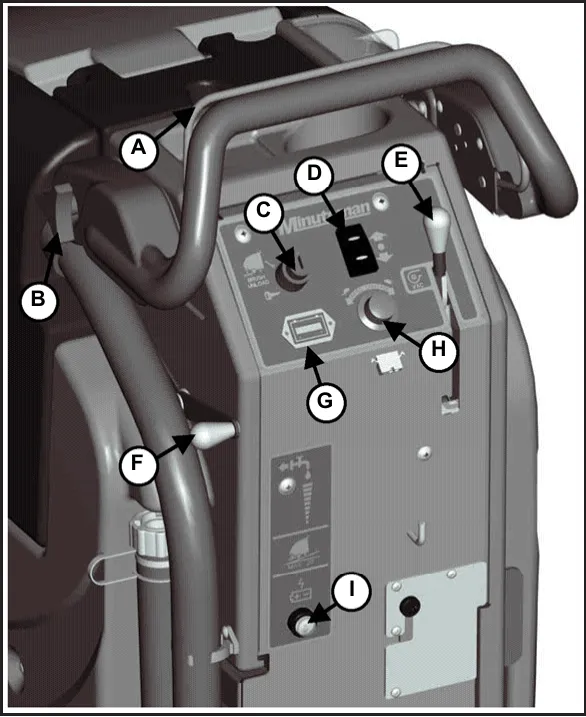
| Key | Item |
|---|---|
| A | Bail handle |
| B | Handle adjustment knob |
| C | Key switch |
| D | Direction switch |
| E | Squeegee lift lever |
| F | Solution control lever |
| G | Battery / fault gauge |
| H | Speed control |
| I | Charge status indicator |
Control functions
Bail handle
(A) When the scrub deck is lowered to the floor, the bail handle enables the brush motor and moves the machine forward once depressed. This also allows the operator to automatically load the brush when the scrub deck is lowered.
Handle adjustment knobs
(B) Allows the handle position to be raised or lowered.
Key switch
(C) Controls the machine’s power (Brush Unload/Off/On) with a key for safety. This switch, when turned counter clockwise, operates the auto brush unload when scrub deck is in the raised position. When it is turned to the on position, the machine will operate.
Direction switch
(D) This switch sets the direction the machine will move when the bail handle is pulled. Forward, Neutral, Reverse.
Squeegee lift lever
(E) When actuated to the top position, the squeegee is lowered and the vacuum motor will turn on when bail handle is depressed. When locked in the bottom position, the squeegee is raised and the vacuum motor shuts off after a 10 second delay.
Solution control lever
(F) This lever controls the rate at which solution is put down. Moving the lever up will increase the amount of solution. Moving the lever down will decrease the solution rate. Moving the lever all the way down shuts off solution flow.
Battery / fault gauge
(G) This gauge displays the remaining battery charge. This gauge also displays any fault codes that might occur with the Drive Motor Controller (see Diagnostic Codes).
Speed control
(H) This control sets the speed at which the machine will move.
Charge status indicator
(I) This gauge displays the status of the batteries during charging. The gauge has a readout of 3 LEDs. 1 Green, 1 yellow, 1 Red. Green indicating a full charge, Yellow indicating 80% charged, Red indicating the batteries are charging.
Circuit breakers and battery compartment
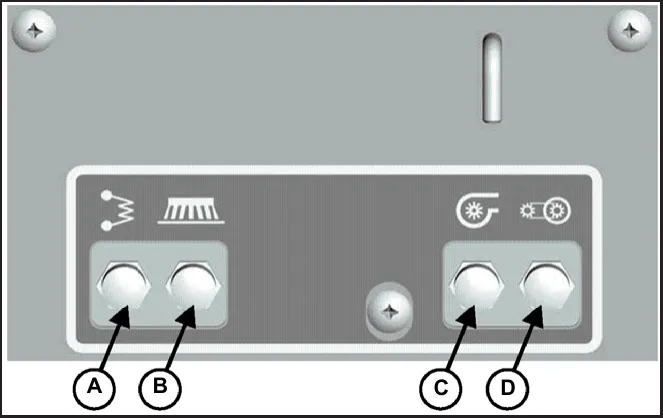
Circuit breakers
The circuit breakers are located at the bottom of the back panel of the machine.
| Key | Item |
|---|---|
| A | Main Control Circuit Breaker - 4A |
| B | Brush Motor Circuit Breaker - 30A |
| C | Vacuum Motor Circuit Breaker - 20A |
| D | Drive Motor Circuit Breaker - 20A |
If any of the functions above are not operating, check if the circuit breaker buttons have tripped. Press to reset.
Battery compartment
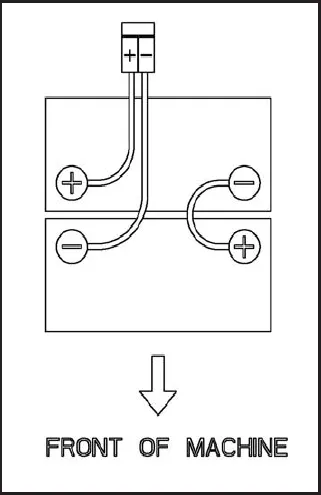
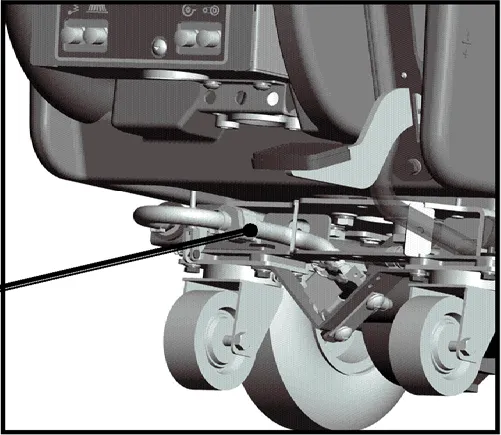
The battery compartment is located under the recovery tank. The Battery compartment can be accessed for servicing and maintenance by tilting the recovery tank (make sure recovery tank has been drained before tilting). The battery compartment contains two 12-volt batteries connected in series. Connect the batteries according to the battery connection diagram (see diagram). The battery tray may be drained if necessary using the orange drain hose located above the rear caster on the right side of the machine.
Diagnostic code guide and optional hour meter
Diagnostic code guide
When an error or fault occurs within the machine, a fault code will appear on the battery gauge represented by a specified number of flashing LEDs. (See “Troubleshooting” for further information)
The “Diagnostic Codes” decal (715699) on the machine reads: “The number of flashing bars on the battery gauge represent fault codes as indicated below:”
| Bars | Fault | Check |
|---|---|---|
| 1# | Low Battery Voltage | Check condition of battery and connections |
| 2# | Drive Motor Fault | Check all connections between the motor and controller |
| 3# | Drive Motor Short Circuit | Motor has a short circuit to a battery connection. Contact Service Agent |
| 4# | Battery Lockout | Battery voltage is too low, controller is preventing function. Charge Batteries |
| 5# | Not Used | |
| 6# | Drive Inhibit | Check battery charger, drive is inhibited when plugged in |
| 7# | Throttle fault | Restart keyswitch-bail handle was activated prior to turning machine on |
| 8# | Drive Controller Fault | Check all connections are secure |
| 9# | Not Used | |
| 10# | High battery voltage | Check condition of battery and connections |
Please refer to manual for detailed trouble shooting information.
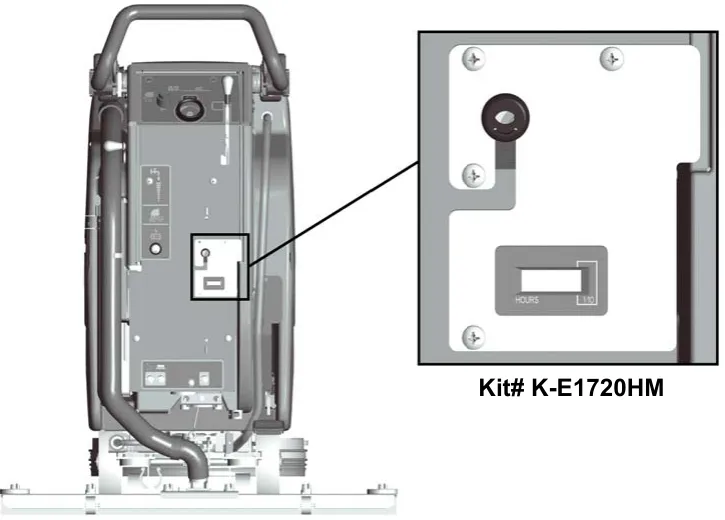
Optional hour meter
Minuteman offers an optional hour meter for this machine. The optional kit replaces the power cord mounting bracket at the rear of the machine with one that contains an hour meter.
Rear squeegee
Rear squeegee
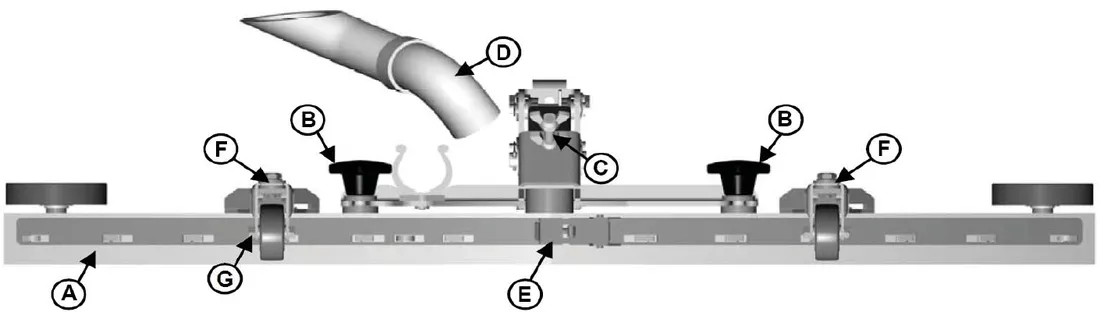
| Key | Item |
|---|---|
| A | Squeegee |
| B | Star-shaped knob |
| C | Adjusting screw for angle adjustment |
| D | Suction hose |
| E | Blade fastening latch |
| F | Washers for caster height adjustment |
| G | Caster Wheel Axle |
Cleaning the squeegee
Check the squeegee (A) daily and clean as necessary.
- Pull off the suction hose (D).
- Loosen the two star-shaped knobs (B).
- Remove the squeegee (A).
Changing the squeegee blades
Check the inner and outer squeegee blades on the squeegee (A) weekly for signs of wear. The squeegee blades can be reused by turning them (can be turned for 4 total uses). Parts ›
- Pull off the suction hose (D), loosen the two star-shaped knobs (B) and remove the squeegee.
- Unlock the fastening device (E) and remove the outer squeegee blade. Turn the squeegee blade or install a new one, as necessary. Change the inner squeegee blade in the same way.
Adjusting the squeegee blades: angle adjustment
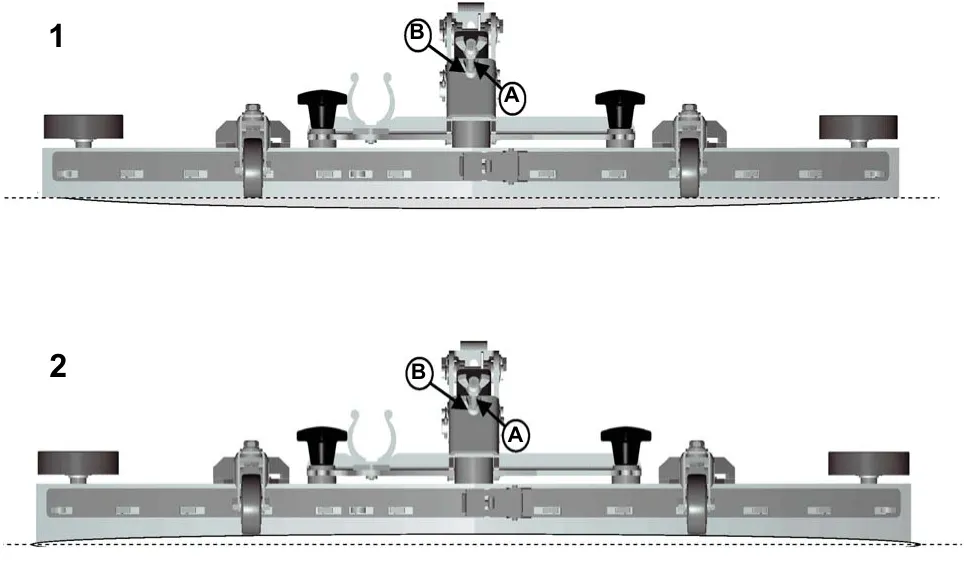
The angle adjustment is the decisive factor in ensuring that the squeegee blades on the squeegee lie evenly on the floor.
- Park the machine on a level surface and lower the squeegee.
- Loosen the lower wing nut (B) on the adjusting screw (A) and adjust the squeegee using the adjusting screw so that the ends of the squeegee blades still have contact with the floor. By turning the adjusting screw (A) counterclockwise, the clearance between squeegee blade and floor is increased in the center (Fig. 1). When turning the adjusting screw (A) clockwise, the clearance between squeegee blade and floor is reduced in the center (Fig. 2).
- Switch the machine on and check the suction pattern. When the machine is in operation, the entire surface of the squeegee blades (center and outer areas) must be applied as evenly as possible.
- Tighten the lower wing nut (B) on the adjusting screw (A) against the metal bracket to lock in the pitch setting.
Adjusting the squeegee blades: height adjustment
If streaks are present, despite an optimum angle adjustment, the clearance between the caster wheels and floor must be adjusted by changing the number of washers underneath the bracket that holds the wheel. The squeegee height is preset at the factory to 0.08 in (2 mm).
In cases of uneven floors, e.g. grouted tile, etc., try the 0.12 in (3 mm) illustration for washer configuration. In cases of very uneven floors, e.g. poorly laid tiles (water does not run off), configure as shown in the 0.16 in (4 mm) illustration.
Keep the extra washers by installing them above the bracket as shown.
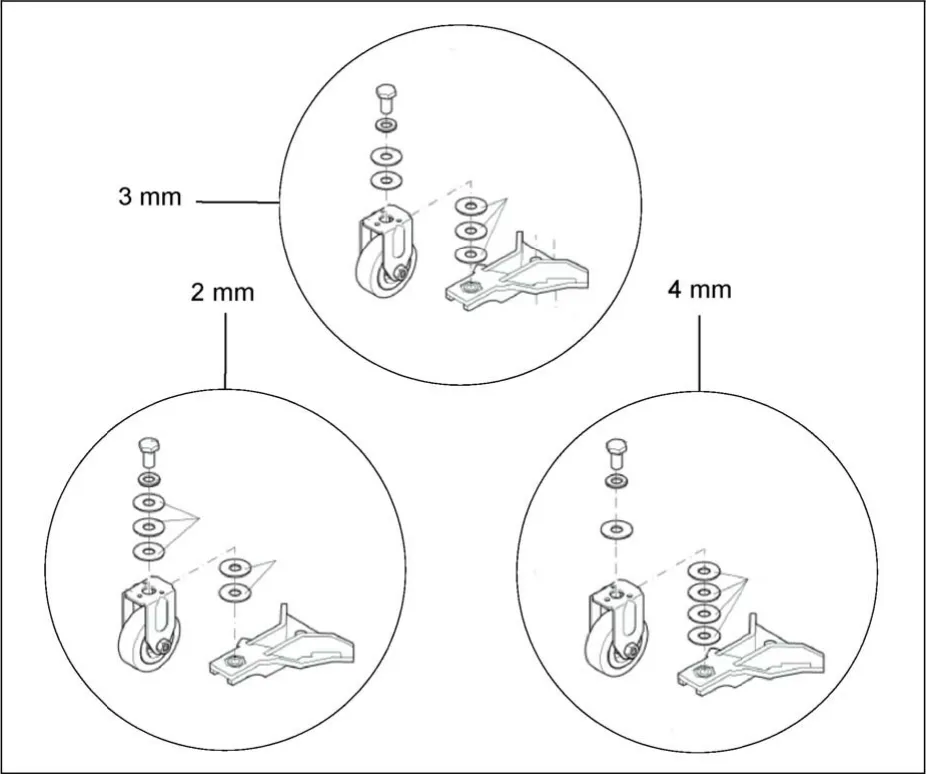
The drawing is labeled in millimeters only: 2 mm is 0.08 in, 3 mm is 0.12 in and 4 mm is 0.16 in.
Handle adjustment
The handle was designed with operator comfort in mind. The angle and horizontal position of the handle can be adjusted to suit the needs of the operator.
Angle adjustment
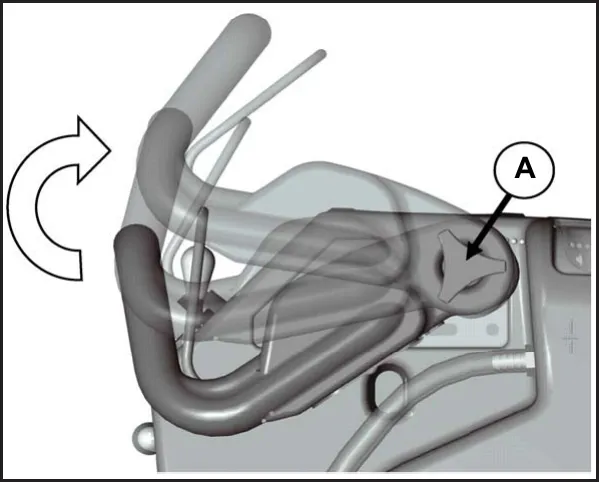
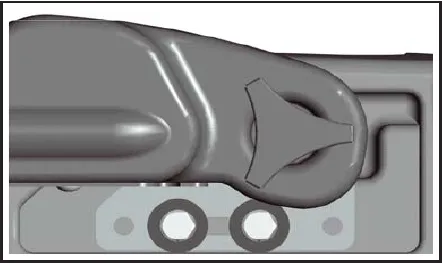
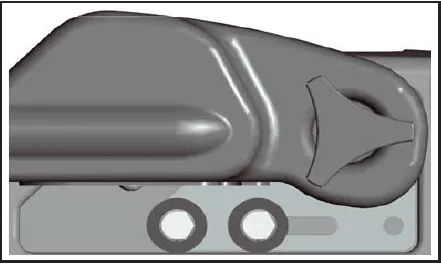
The handle angle can be adjusted without tools by loosening the Angle Adjustment Knob (A) on each side and rotating the handle to the desired position. There are 5 angular positions 11.25° apart for a total of 45° between the minimum and maximum position.
Horizontal adjustment
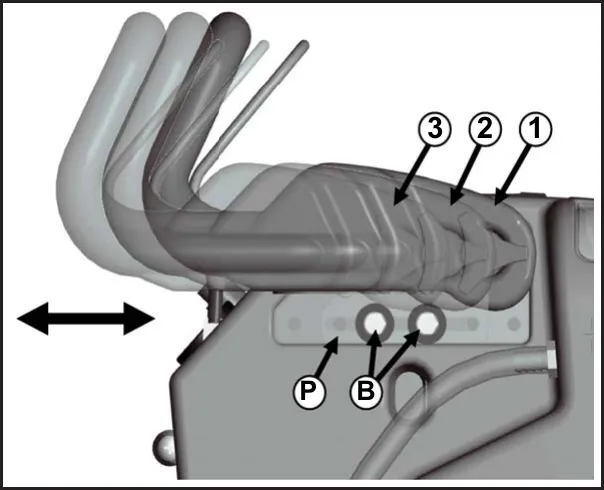
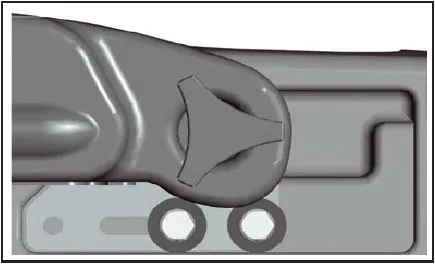
The horizontal position can be adjusted by removing the 4 Mounting Bolts (B) (2 each side) with a 9/16” socket and sliding the Mounting Plate (P) to one of the 3 available positions. The machine is shipped from the factory in position 1.
Aqua-Saver solution control
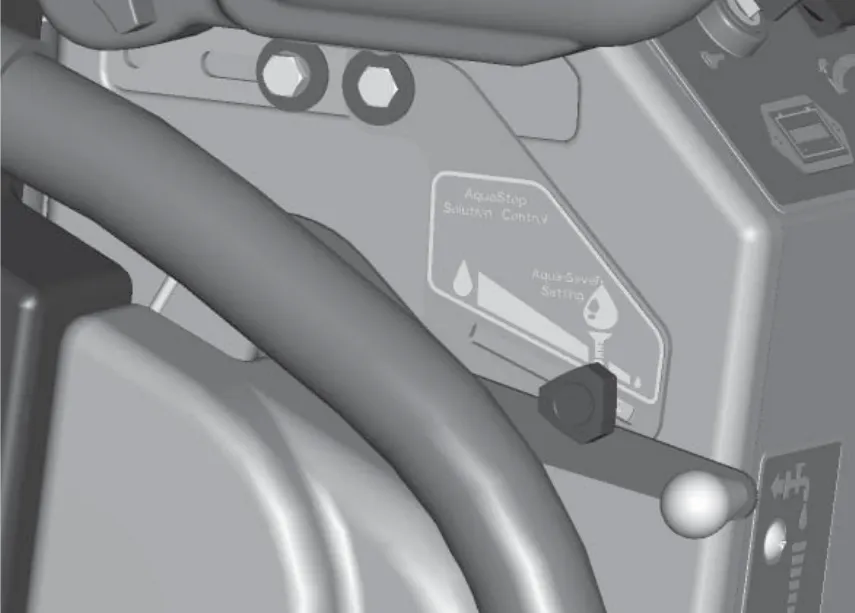
In order to consistently conserve water when using Aquastop brushes, the guide will stop the solution control lever at a low rate setting. This setting may be adjusted by loosening the knob, adjusting the lever, and retightening the knob. Slide the knob all the way forward to dispense maximum solution.
Solution tank drain hose
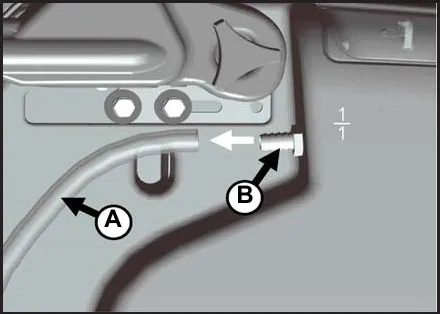
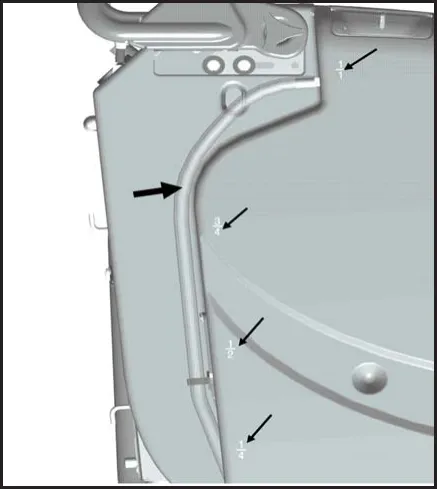
The solution tank may be drained by removing the Solution Tank Drain Hose (A) from the Hose Barb (B) and routing the hose to a floor drain.
Solution level indicator
The Solution Tank Drain Hose also serves as a water level indicator for the solution tank. The amount of water remaining in the solution tank can be seen through the clear drain hose. Level markers molded into the solution tank are positioned at 1/4, 1/2, 3/4, and full levels.
Solution fill filter
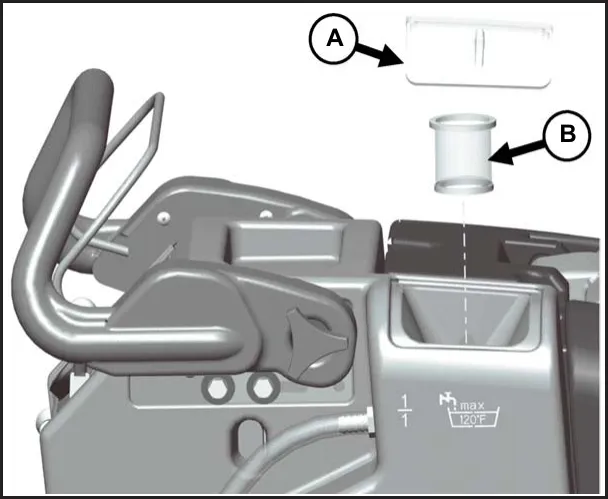
The Solution Fill Filter (B) should be cleaned regularly. To remove, simply open the Solution Tank Lid (A) and pull the filter out.
Screened float
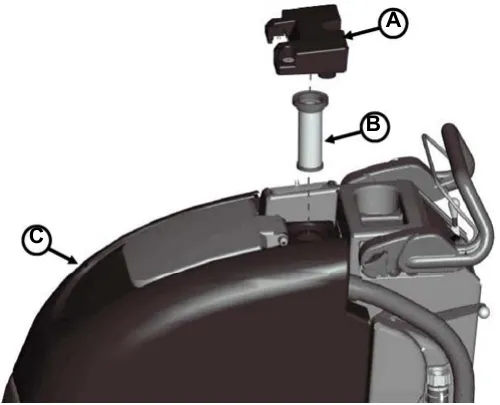
If the recovery tank (C) is overfilled or a large amount of foaming is present, the screened float (B) blocks the vacuum intake inside the tank protecting the vacuum motor and internal electronics from water damage. It is essential to keep the float in working order through regular maintenance.
The float should be cleaned daily by thoroughly rinsing with a hose. Removal of the screened float is not necessary for daily maintenance.
At least once a month the screened float should be completely removed, cleaned, and checked for any damage to the seal or metal screen.
Screened float removal
The screened float is positioned between the vacuum manifold (A) and recovery tank (C). The screened float (B) can be accessed by removing the 1.5” bolt (D) and two 1.25” bolts (E) that attach the manifold to the recovery tank using a 7/16” socket.
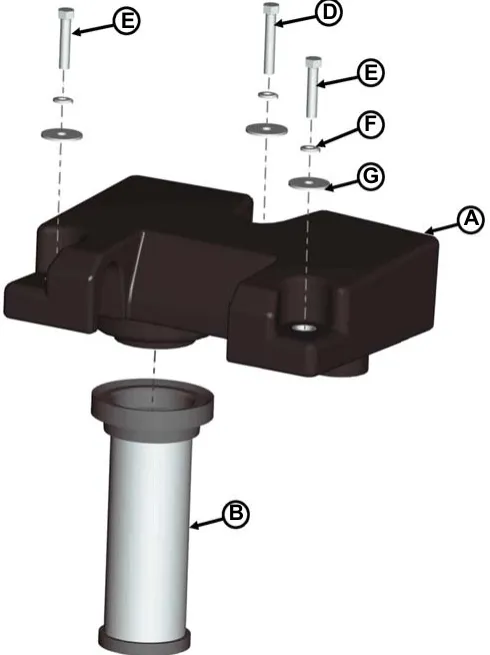
| Key | Item |
|---|---|
| A | Vacuum Manifold |
| B | Screened Float |
| C | Recovery Tank |
| D | 1.5” Bolt |
| E | 1.25” Bolt (2) |
| F | Helical Washer (3) |
| G | Flat Washer (3) |
Recovery tank drain hose
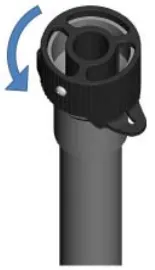
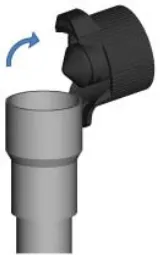
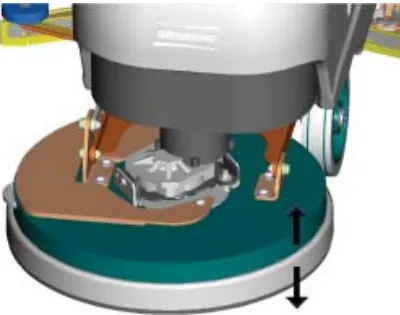
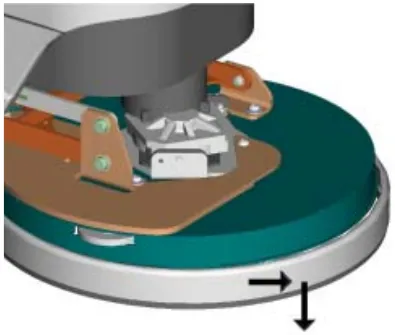
Deck skirt removal
(Do not lower with out brush)
In-line solution filter assembly
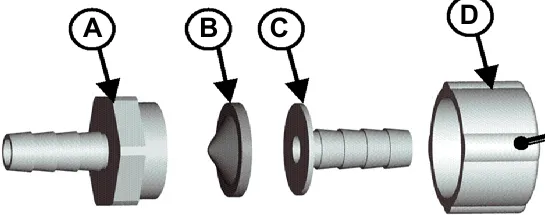
The solution solenoid, which shuts off solution flow when the bail handle is released, is protected from debris by the in-line filter assembly. The filter assembly is located at the rear of the machine on the left hand side, just under the solution tank. It is important to check and clean the screened washer inside the assembly regularly to ensure proper solution flow. To open, unscrew the assembly (Note that the cone of the washer is facing out toward the rear of the machine). Remove washer and rinse, reinsert and screw assembly together, tightening by hand. Overtightening with tools may damage the plastic threads.
| Key | Item |
|---|---|
| A | Fitting, MGHT |
| B | Screened Washer |
| C | Hose Barb Insert |
| D | Fitting, FGHT |
The E17/E20/H20
Batteries and chargers: make sure your charger is compatible with your batteries, and set its charging algorithm to your battery pack before you use it.
This machine was designed with total operator comfort and ease of use in mind. All machine components have been designed as a total system to efficiently clean dirty floors. The machine has two available scrub head types and sizes to fit specific applications. Please contact your Minuteman® representative for specific recommendations for the correct scrub head type, size, and brush type and chemical applications.
Before using the machine, always perform the following steps to ensure proper machine operation:
- Check under the machine for leaks.
- Check the rear squeegee for wear and damage.
- Check the solution and recovery tank levels.
After using the machine, always perform the following steps:
- Check the battery charge level. Charge batteries if necessary. When charging batteries, extra precaution is required:
- Battery acid can cause burns.
- When working on or around batteries, always wear protective clothing and safety glasses.
- Remove metal jewelry. Do not lay tools or metal objects on top of the batteries.
- Charging batteries generate explosive gasses. DO NOT CHARGE BATTERIES WHEN OPEN FLAMES OR SPARKS ARE PRESENT. DO NOT SMOKE.
- Charge the batteries in a well-ventilated area.
- Fluid levels should be checked before and after charging and maintained at the proper levels. If low, add distilled water until the metal plates are covered.
- If the machine is not used for an extended period of time, batteries should be kept fully charged with a boost charge once a week.
- Check for wire, string, or twine wrapped around the scrub brushes.
- Check the rear squeegee for wear and damage.
- Check the rear squeegee suction hose for obstructions.
- Drain and clean the recovery tank and drain hose cap.
- Check under the machine for leaks.
- Check the service records to determine maintenance requirements.
Machine operation
To turn on machine
Turn key to operate position ( I ). Wait for battery gauge to stop flashing. (If flashing continues, see troubleshooting guide)
To turn on vacuum
Lower squeegee into operating position, vacuum motor will turn on when bail handle is depressed.
To turn on brush motor
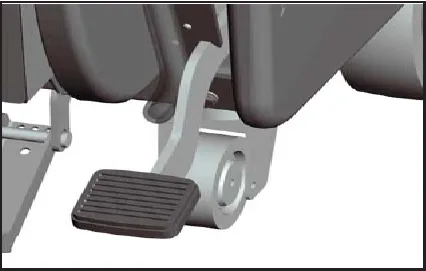
Lower the scrub deck to the floor by moving the brush lift pedal from the “home” (down) position to the operating position (up). Depress the operator bail handle. Brush motor will turn on.
To turn on cleaning solution
Move solution lever from closed (down) position up to the desired flow position. With the scrub deck on the floor, depress the bail handle, solution will begin to flow.
Note: The solution solenoid will stop solution flow whenever the bail handle is released.
Direction switch
Select direction of machine by moving the directional rocker switch from the neutral position to the forward or reverse position. The direction of the machine movement is shown on the operator panel with forward and reverse arrows.
Speed control
Move the speed dial to the desired position. Turning the dial clockwise increases the speed. Turning the dial counterclockwise decreases the speed.
Driving
Depress the operator bail handle, the machine will move in the direction selected.
To charge batteries
Batteries and chargers: make sure your charger is compatible with your batteries, and set its charging algorithm to your battery pack before you use it.
When the battery / fault gauge reaches the red zone the batteries need to be recharged. Take the machine to a well ventilated area, unwind the battery charger power cord from the electrical box cover and plug into an appropriate power source. After approximately 10 seconds the battery charge status indicator will turn on.
Solution solenoid
Water solenoid will operate when the brush motor is turned on. The solution lever must be moved to the desired operating position, but does not need to be moved to the closed position when stopping for brief periods.
Hour meter (optional)
Hour meter will automatically record operating time of the brush motor.
Loading brush
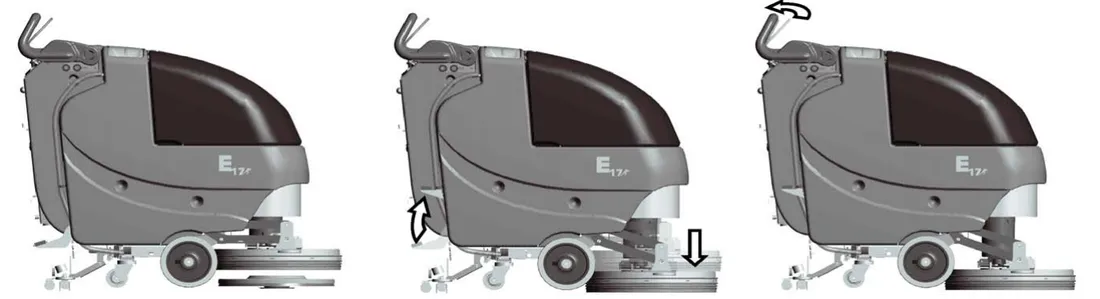
- To load the brush, first center the brush deck over the scrub brush.
- Lower the scrub deck by releasing the deck lift pedal.
- With the key turned on, pull the bail handle to engage the scrub brush onto the scrub deck.
Unloading brush
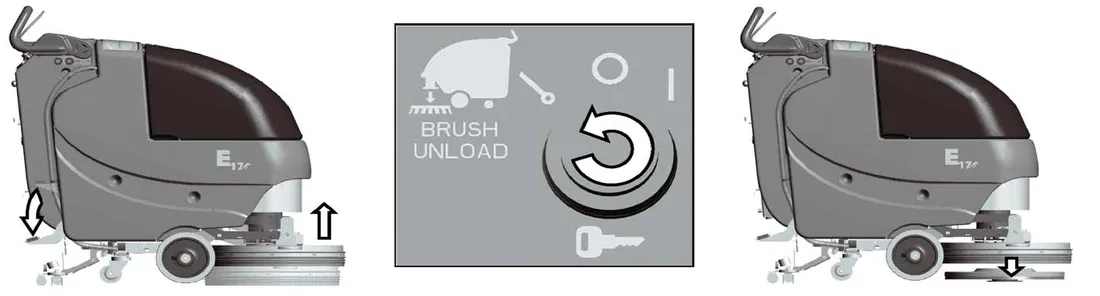
- To unload the brush, first lift the scrub deck by pressing down on the deck lift pedal. Make sure the pedal is in the “home” position shown below.
- Momentarily turn the key (1 to 2 seconds) to the “Brush Unload” position then let the key return to the off (O) position.
- When done correctly the brush should release from the scrub deck and fall to the floor.
After use
- When finished scrubbing, lift the scrub deck and turn the solution lever off. Lift the rear squeegee (the vacuum motor will turn off after 10 seconds). Move the machine to a service area for daily maintenance and review items that may need service.
- Empty the solution tank by disconnecting the solution tank drain hose from the barb fitting and routing hose to a drain. Rinse the tank with clean water to prevent any buildup of dried chemicals that could clog the plumbing inside the recovery tank, and the drain hose cap.
- Empty and clean the recovery tank by flushing with a hose. Be sure to also clean the float shut off screen.
- Remove the brushes or pad holders and rinse them in warm water and hang to dry.
- Remove the rear squeegee, rinse with warm water and reinstall after cleaning.
- Check the maintenance schedule in the next section and perform any required maintenance before storing the machine.
- Store the machine indoors in a clean dry place. Keep from freezing. Leave solution and recovery tank lids open for ventilation to prevent odor buildup.
- Turn Key switch OFF (O) and remove key.
Maintenance
| Daily | Weekly | Monthly | Yearly |
|---|---|---|---|
| Charge Batteries | Check Each Battery Cell(s) Water Level | Lubrication – Grease Fittings | Check Carbon Brushes Parts › |
| Check/Clean Tanks & Hoses | Check/Clean brush deck skirt Parts › | ||
| Check/Clean the Brush/Pad Parts › | Check/Clean Solution Filter Parts › | ||
| Check/Clean the Squeegee Parts › | |||
| Check/Clean Vacuum Shut-Off Float in Recovery Tank |
Have a qualified service technician check the vacuum motor carbon motor brushes once a year or after 300 operating hours.
The brush motor and transaxle motor carbon brushes should be checked every 500 hours or once a year.
NOTE: Refer to the Service Manual for more detail on maintenance and service repairs.
Lubrication
Regularly scheduled lubrication of certain machine parts should be performed to insure trouble-free operation of the machine.
Apply a generous amount of grease into the fittings on the rear caster swivel (2) until grease seeps out around the bearings.
Apply lubricant or light machine oil to lubricate the:
- Pivot mounting point of the rear squeegee to the chassis (1)
- Rear squeegee caster wheel axle (2)
Troubleshooting
| Problem | Possible Cause | Remedy |
|---|---|---|
| Poor water pick-up | Worn or torn squeegee blades | Rotate or replace blades Parts › |
| Recovery tank full | Empty recovery tank | |
| Recovery tank drain hose leak | Secure drain hose cap or replace Parts › | |
| Recovery tank lid gasket leak | Replace gasket lid cover properly Parts › | |
| Debris caught in squeegee | Clean squeegee | |
| Vacuum hose clogged | Remove debris and flush hose | |
| Using too much solution | Adjust solution control lever | |
| Recovery hose to squeegee or recovery tank disconnected or damaged | Reconnect or replace recovery hose Parts › | |
| Poor scrubbing performance | Worn brush | Replace brush or pad Parts › |
| Wrong brush or cleaning chemical | Consult Minuteman | |
| Debris caught on scrub brush | Remove debris | |
| Moving machine too fast | Adjust Speed | |
| Not using enough solution | Adjust solution flow setting | |
| Low battery charge | Recharge batteries | |
| Retaining ring on brush motor shaft not in groove | Remove brush hub assembly and slide ring into groove | |
| Inadequate solution flow or no solution to the floor | Solution tank empty | Fill solution tank |
| Solution lines, valves, or filter clogged | Flush lines and clean solution filter. Parts › | |
| Solution Lever in down position | Move lever up | |
| Machine does not operate | Tripped Control Power circuit breaker | Reset Breaker |
| Batteries have low charge | Recharge Batteries | |
| Battery charger operating | Unplug battery charger when charge is complete |
Troubleshooting, continued
| Problem | Possible Cause | Remedy |
|---|---|---|
| Vacuum motor does not turn on | Recovery tank full | Empty recovery tank |
| Excessive foaming in recovery tank. | Empty recovery tank. Use less or change chemical. Use defoaming agent. | |
| Carbon Brushes worn | Replace carbon brushes Parts › | |
| Vacuum switch disconnected | Connect wiring | |
| Tripped vacuum motor circuit breaker | Reset breaker | |
| Broken vacuum limit switch | Replace switch by squeegee lift lever | |
| Squeegee in raised position | Lower squeegee | |
| Brush does not unload | Foot pedal not in “home” position | Place pedal in notch |
| Tripped brush motor circuit breaker | Reset breaker | |
| Broken brush motor switch | Replace switch | |
| Damaged brush block or drive hub | Replace | |
| Retaining ring on brush motor shaft not in groove | Remove brush hub assembly and slide ring into groove |
Charger warning indicators
| LED Status | Description | |
|---|---|---|
| Warning | RED LED lamp blink once | Output open circuit or short circuit or reverse polarity connection of charger to battery. Battery voltage is too high (may be connected to wrong voltage battery). |
| RED LED lamp blink twice | Abnormal cycle (may be weak or bad battery) Charging time has safety timed out due to battery problem. |
Fault / diagnostic codes
The Battery / Fault gauge will flash when a fault is detected. A decal labeled “Diagnostic Codes” is located below the battery gauge as an abbreviated and convenient guide to determine the cause of the fault and the remedy (refer to machine or see “Diagnostic Code Guide” section of this manual). The flashing codes are for the following:
| Gauge reading | Meaning and action |
|---|---|
| 1 Bar# | The battery needs charging, there is a bad connection to the battery or dependent on programming, may indicate that the battery lockout function is active and the controller is in a restricted mode of operation. Check the connections to the battery. If the connections are good, try charging the battery. |
| 2 Bar# | There is a bad connection to the motor. Check all connections between the motor and the controller. |
| 3 Bar# | The motor has a short circuit to a battery connection. Contact your service agent. |
| 4 Bar# | The battery charge level has fallen below the Battery Lockout level and the controller is inhibiting certain machine functions. Charge the battery. |
Fault / diagnostic codes, continued
| Gauge reading | Meaning and action |
|---|---|
| 5 Bar# | Not used. |
| 6 Bar# | The controller is being inhibited from driving, this may be because the battery charger is connected. |
| 7 Bar# | The bail handle was activated prior to turning the machine on. Make sure that the bail handle is in the rest position. Restart the key switch. |
| 8 Bar# | A controller fault is indicated. Make sure that all connections are secure. |
| 9 Bar# | Not used. |
| 10 Bar# | An excessive voltage has been applied to the controller. This is usually caused by a poor battery connection. Check the battery connections. |
CE Declaration of Conformity
This page of the printed manual is blank apart from its heading.
CE Declaration of Conformity
This page of the printed manual is blank apart from its heading.
Minuteman International Made Simple Commercial Limited Warranty
REVISION O
EFFECTIVE 4/1/2016
Minuteman International, Inc. warrants to the original purchaser/user that the product is free from defects in workmanship and materials under normal use. Minuteman will, at its option, repair or replace without charge, parts that fail under normal use and service when operated and maintained in accordance with the applicable operation and instruction manuals. All warranty claims must be submitted through and approved by factory authorized repair stations.
This warranty does not apply to normal wear, or to items whose life is dependent on their use and care, such as belts, cords, switches, hoses, rubber parts, electrical motor components or adjustments. Parts manufactured by Minuteman are covered by and subject to the warranties and/or guarantees of their manufacturers. Please contact Minuteman for procedures in warranty claims against these manufacturers.
Special warning to purchaser -- Use of replacement filters and/or pre-filters not manufactured by Minuteman or its designated licensees, will void all warranties expressed or implied. A potential health hazard exists without original equipment replacement.
All warranted items become the sole property of Minuteman or its original manufacturer, whichever the case may be.
Minuteman disclaims any implied warranty, including the warranty of merchantability and the warranty of fitness for a particular purpose. Minuteman assumes no responsibility for any special, incidental or consequential damages.
This limited warranty is applicable only in the U.S.A. and Canada, and is extended only to the original user/purchaser of this product. Customers outside the U.S.A. and Canada should contact their local distributor for export warranty policies. Minuteman is not responsible for costs or repairs performed by persons other than those specifically authorized by Minuteman. This warranty does not apply to damage from transportation, alterations by unauthorized persons, misuse or abuse of the equipment, use of non-compatible chemicals, or damage to property, or loss of income due to malfunctions of the product.
If a difficulty develops with this machine, you should contact the dealer from whom it was purchased.
This warranty gives you specific legal rights, and you may have other rights which vary from state to state. Some states do not allow the exclusion or limitation of special, incidental or consequential damages, or limitations on how long an implied warranty lasts, so the above exclusions and limitations may not apply to you.
Warranty terms
| Model | Parts | Labor | Poly | Travel** |
|---|---|---|---|---|
| Cord Electric Group | 5yrs | 3yrs | 12yrs | 90 days |
| Battery Operated Group | 5yrs | 3yrs | 12yrs | 90 days |
Exceptions
| Model | Parts | Labor | Poly | Travel** |
|---|---|---|---|---|
| Port A Scrub, all models | 1yr | 6months | 12yrs | 90 days |
| A3S Blower | 1yr | 1yr | 0 | 0 |
| Phenom Dual Motor Upright Vacuums | 2yrs | 2yrs | 0 | 0 |
| Explosion Proof Vacuum | 1yr | 1yr | 0 | 0 |
| Propane Burnisher | 1yr | 1yr | 0 | 90 days |
**Travel, 2 hours max
| Stand-alone Battery Chargers: | One year |
| Replacement Parts: | Ninety days |
| Batteries: | 0-3 months full replacement, 4-12 months pro-rate |
| Polypropylene Plastic Tanks: | 12yr warranty, no additional labor |
Excellence meets clean
Minuteman®, Minuteman International, Inc. · 14N845 U.S. Route 20 · Pingree Grove, Illinois 60140 USA
Phone 800-323-9420 · www.minutemanintl.com · Email: techsupport@minutemanintl.com
A Member of the Hako Group
988721UM, Rev E 07/16.
Minuteman and PowerBoss are trademarks of Minuteman International, Inc. Southeastern Equipment & Supply is an independent dealer.