Free Shipping on Equipment & Parts orders of $200 or more! * Click for Restrictions

Have a question? 800-440-6723 International: 803-252-0100

English Se habla español
Parts › PartFinder › Tennant i-mop Lite › Operator manual
Form 9030350, Rev. 03 (02/2025)
Tennant · Micro-scrubber

Tennant i-mop Lite Operator Manual

9030350 Rev. 03 (02/2025)38 pages1273252 SCRBR, i-mop Lite, Global, cord, charger (SN 22xxxx)
Before first use: charge the batteries overnight before you run the machine the first time.
Free to read, no account neededEvery page has its own linkPart numbers link to the part
COVER

i-mop® Lite User manual

Auto scrubber for hard floor surfaces‌‌​⁠⁠‍‍⁠​‍‍​​⁠‌⁠​​​‍​​​​​​​‌​​​‌​⁠​​‍‌‍​​‌‌‌‌‍‍​‌​⁠​⁠⁠‌​​‌‍‌

Model part No.: 1273252- SCRBR, [I-MOP LITE, GLOBAL, CORD, CHARGER

Form number: 9030350
Revision: 03 (02/2025)
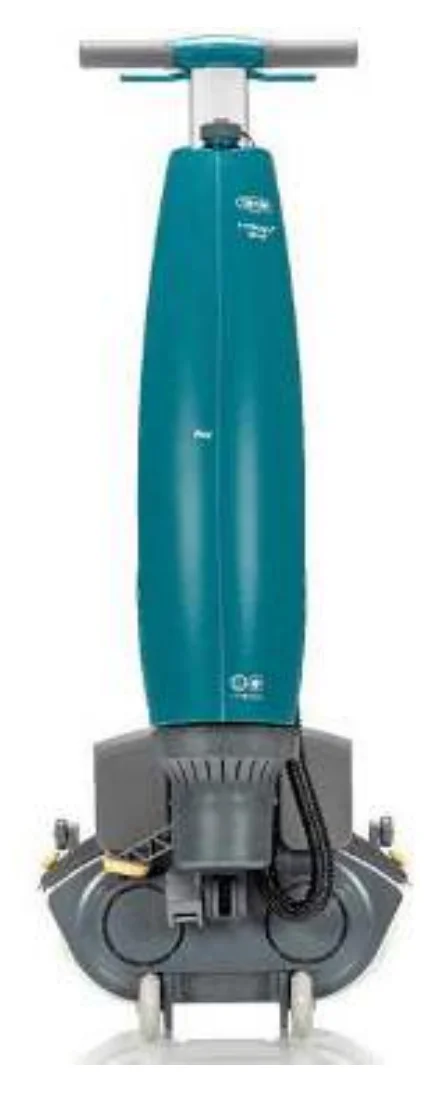
Cover photo of the Tennant i-mop Lite auto scrubber, a tall teal upright machine with a grey T-shaped handle at the top and a grey scrub head with transport wheels at the base
Source: Tennant i-mop Lite Operator Manual 9030350 Rev. 03 (02/2025), page 1, used with permission. SES ref PF-E2IM-Q2GR‌‌​⁠⁠‍‍⁠​‍‍​​⁠‌⁠​​​‍​​​​​​​‌​​​‌​⁠​​‍‌‍​​‌‌‌‌‍‍​‌​⁠​⁠⁠‌​​‌‍‌
i-mop Lite 9030350 (03 (02/2025))Page 1 of 38
Preface

Preface

In short This preface introduces the i-mop® Lite, a battery operated auto scrubber with two counter-rotating brushes that cleans to the edge and under obstacles. It uses less water and chemicals and reduces the risk of slippery floors.‌‌​⁠⁠‍‍⁠​‍‍​​⁠‌⁠​​​‍​​​​​​​‍​​​‌​⁠​​‍‍‌‍​​⁠⁠⁠‍‌​​​⁠‌⁠‌‍⁠⁠‍​​

Thank you for choosing the i-mop® Lite, the auto scrubber that cleans faster, cleaner, safer, greener, and is better for everyone. The i-mop® Lite's compact design allows you to clean right to the edge and under obstacles, minimizing manual scrubbing. The battery operated i-mop® Lite is equipped with two counter-rotating brushes that provide a deep scrub and a great cleaning result. The i-mop® Lite significantly reduces the amount of water and chemicals needed which leads to a greener result. It also reduces the risk of slippery floors.‌‌​⁠⁠‍‍⁠​‍‍​​⁠‌⁠​​​‍​​​​​​​‍​​​‌​⁠​​‍‍‌‍​​⁠⁠⁠‍‌​​​⁠‌⁠‌‍⁠⁠‍​​

Antibacterial tanks

The tanks on the i-mop® use an antibacterial mix-in to make the plastic safer both inside and outside. Because it is mixed into the plastic, the effect will last the lifetime of the tank. The reduction of bacteria reduces the odours coming from the recovery tank and protects operators who handle the tank every day. Bacterial reduction in contact with the tank wall has been certified and tested at ≥99.99% efficacy.

Source: Tennant i-mop Lite Operator Manual 9030350 Rev. 03 (02/2025), page 2, used with permission. SES ref PF-VDAN-IOOF‌‌​⁠⁠‍‍⁠​‍‍​​⁠‌⁠​​​‍​​​​​​​‍​​​‌​⁠​​‍‍‌‍​​⁠⁠⁠‍‌​​​⁠‌⁠‌‍⁠⁠‍​​
i-mop Lite 9030350 (03 (02/2025))Page 2 of 38
INTRODUCTION

Purpose of the user manual

In short This manual explains how to use the i-mop® Lite correctly, efficiently and safely. It covers safety, use, maintenance, storage and disposal, and its instructions should be followed to avoid injury or damage.‌‌​⁠⁠‍‍⁠​‍‍​​⁠‌⁠​​​‍​​​​​​​⁠​​​‌​⁠​​⁠​‍​⁠⁠‍⁠​‍‌‍​‌⁠‍⁠‍‍⁠‌​‍‍

The purpose of the user manual is to provide the user with information in such a way that during the life of the i-mop® Lite, the machine is used correctly, efficiently and safely, even in the event of reasonably foreseeable misuse, as described in section 1.2 of this manual.‌‌​⁠⁠‍‍⁠​‍‍​​⁠‌⁠​​​‍​​​​​​​⁠​​​‌​⁠​​⁠​‍​⁠⁠‍⁠​‍‌‍​‌⁠‍⁠‍‍⁠‌​‍‍

The user manual contains instructions regarding:

  • Personal operator safety
  • Intended and non-intended use of the i-mop® Lite
  • Instructions for daily use
  • Maintenance instructions
  • Storage conditions
  • Disposal of the i-mop® Lite

These instructions must be considered to avoid risks that could lead to physical and/or material damage.

Target audience

This user manual is intended for operators of the i-mop® Lite and their supervisors, as well as partners and importers.

Operators of the i-mop® Lite

The i-mop® Lite may only be operated by a person who has correctly read and understood the instructions in this manual or is trained by an experienced operator who has read and understood the instructions in this manual.

Source: Tennant i-mop Lite Operator Manual 9030350 Rev. 03 (02/2025), page 3, used with permission. SES ref PF-FKEC-WOAI‌‌​⁠⁠‍‍⁠​‍‍​​⁠‌⁠​​​‍​​​​​​​⁠​​​‌​⁠​​⁠​‍​⁠⁠‍⁠​‍‌‍​‌⁠‍⁠‍‍⁠‌​‍‍
i-mop Lite 9030350 (03 (02/2025))Page 3 of 38
SAFETY

Reading guide

In short This page explains the symbols and terms used throughout the manual to flag safety issues and important information. Learn what each symbol means before operating the machine.‌‌​⁠⁠‍‍⁠​‍‍​​⁠‌⁠​​​‍​​​​​​‌​​​​‌​⁠​​​⁠‍⁠‌‌‍‍⁠⁠⁠⁠‍‍​​​​​​‍​⁠‌

The following symbols and terms are used throughout this manual to alert the reader to safety issues and important information:‌‌​⁠⁠‍‍⁠​‍‍​​⁠‌⁠​​​‍​​​​​​‌​​​​‌​⁠​​​⁠‍⁠‌‌‍‍⁠⁠⁠⁠‍‍​​​​​​‍​⁠‌

SymbolTermExplanation
Blue circular symbol showing an open book
INFORMATIONRead the instructions before using the machine.
Yellow triangular warning symbol with an exclamation mark
WARNINGIndicates a hazardous situation which, if the safety instructions are not followed, can lead to injuries of the operator or bystanders and light and/or moderate damage to the product or the environment.
Yellow triangular caution symbol with an exclamation mark
CAUTIONIndicates a hazardous situation which, if the safety instructions are not followed, can lead to light and / or moderate damage to the product or the environment.
Blue circle with a white exclamation mark, attention symbol
ATTENTIONIndicates a liability situation, where the manufacturer or its partners and affiliates cannot be held accountable for damages caused by non-compliance.
Yellow triangular symbol showing a horseshoe magnet, strong magnet warning
STRONG MAGNETIndicates that the machine contains strong magnets. These can cause pacemakers to stop working or cause electronic data to be damaged, such as information stored on access passes.
Red crossed-out circle with a pacemaker heart symbol, pacemaker warning
PACEMAKERIndicates that operators and maintenance crew wearing pacemakers should keep a minimal distance of 6 in / 15 cm. In this specific case operators may not use the machine as a backpack.
Yellow triangular symbol showing a battery with an acid drop, batteries warning
BATTERIESIndicates a battery-operated machine, batteries must be charged according to the instructions in the separate class I battery charger user manual. Batteries must be disposed of according to your local laws and regulations.
Yellow triangular symbol showing a person slipping, slippery surface warning
SLIPPERY SURFACEIndicates that the machine can cause floors to become slippery. In the workplace, it is advised to place slippery surface signs in these areas.
Source: Tennant i-mop Lite Operator Manual 9030350 Rev. 03 (02/2025), page 4, used with permission. SES ref PF-Z6QE-UTQM‌‌​⁠⁠‍‍⁠​‍‍​​⁠‌⁠​​​‍​​​​​​‌​​​​‌​⁠​​​⁠‍⁠‌‌‍‍⁠⁠⁠⁠‍‍​​​​​​‍​⁠‌
i-mop Lite 9030350 (03 (02/2025))Page 4 of 38
CONTENT

Content

SectionPage
Preface2
Purpose of the user manual3
Target audience3
Operators of the i-mop® Lite3
Reading guide4
Content5
1. Introduction7
1.1. Intended use of the product7
1.2. Non-intended use of the product8
1.3. Lifespan8
1.4. Modifications8
1.5. Specifications9
1.6. Warranty10
1.7. Identification10
2. Description11
3. Safety12
3.1. General safety instructions12
3.1.1 Sweep before scrub12
3.1.2 Brush condition12
3.1.3 Machine orientation12
3.1.4 Antibacterial tanks12
3.1.5 Strong magnets12
3.1.6 Battery12
3.2. Risks during operation13
3.2.1 Dress safely13
3.2.2 Mark the job site13
3.2.3 Careful when parking13
3.3. Risks after operation13
3.3.1 Remove battery13
3.3.2 Machine orientation13
3.3.3 Careful when storing13
4. Transport and storage14
4.1. General14
4.2. Store position14
4.3. Transport outside15
4.4. Transport in a vehicle16
5. Assembly and installation17
5.1. Unboxing17
Source: Tennant i-mop Lite Operator Manual 9030350 Rev. 03 (02/2025), page 5, used with permission. SES ref PF-M2ED-YJPJ‌‌​⁠⁠‍‍⁠​‍‍​​⁠‌⁠​​​‍​​​​​​‌‌​​​‌​⁠​​‍‍‍‌‌‍⁠‌‌⁠‌‍‍⁠‌​​​‌‌⁠⁠​‌
i-mop Lite 9030350 (03 (02/2025))Page 5 of 38
TABLE OF CONTENTS
SectionTitlePage
5.2.Assembly18
5.2.1Charging the battery18
5.2.2Attaching the brushes18
5.2.3Attaching the squeegee19
5.2.4Installing the cleaning solution tank19
5.2.5Installing the recovery tank20
6.Operation21
6.1.Before you start21
6.1.1Inserting the battery21
6.1.2Filling the cleaning solution tank22
6.2.Operation procedure23
6.2.1Walking to the job site23
6.2.2At the job site24
6.2.3ECO mode27
6.2.4Turning off the i-mop® Lite27
6.2.5Emptying tanks27
6.3.Cleaning and storage28
6.3.1Flushing the system28
6.3.2Cleaning the tanks28
6.3.3Cleaning the filter29
6.3.4Removing the battery30
6.3.5Checking the brushes and squeegee30
6.3.6Store in an upright position31
7.Maintenance32
7.1.Brush replacement32
7.2.Squeegee replacement33
7.2.1Detaching the squeegee33
7.2.2Flipping/replacing the squeegee blade33
7.2.3Attaching the squeegee34
7.3.Recommended additional cleaning34
7.4.Recommended service time34
7.5.Accessories34
8.Troubleshooting35
9.Decommissioning and disposal36
10.Parts36
Source: Tennant i-mop Lite Operator Manual 9030350 Rev. 03 (02/2025), page 6, used with permission. SES ref PF-M42Z-VNJO‌‌​⁠⁠‍‍⁠​‍‍​​⁠‌⁠​​​‍​​​​​​‌‍​​​‌​⁠​​​‌‌‌⁠​​‍⁠​‌‌‍‌‍‍‌‌‍‍‍‌⁠⁠
i-mop Lite 9030350 (03 (02/2025))Page 6 of 38
Introduction

1. Introduction

In short This chapter introduces the i-mop Lite, a battery-operated machine, and says who the manual is for. The batteries must be fully charged before use, and the manual must be read fully before first use.‌‌​⁠⁠‍‍⁠​‍‍​​⁠‌⁠​​​‍​​​​​​‌⁠​​​‌​⁠​​⁠‍‍‌​​‍‍​‍​‍​‌⁠‌‌​⁠‍⁠‌⁠⁠

The i-mop® Lite is a safe, user-friendly machine. This manual helps you to get started and explains the operation and maintenance procedure. You will be pleasantly surprised by the fast and effective use of the battery operated i-mop® Lite. The batteries must be fully charged before use. Refer to the operating manual supplied with battery charger (p/n 1263273) for correct charging procedure.‌‌​⁠⁠‍‍⁠​‍‍​​⁠‌⁠​​​‍​​​​​​‌⁠​​​‌​⁠​​⁠‍‍‌​​‍‍​‍​‍​‌⁠‌‌​⁠‍⁠‌⁠⁠

This manual is intended for those who work with the i-mop® Lite and/or perform daily maintenance. The manual must be read fully before the first actions. This manual describes the correct method of use, safety measures, maintenance and transport.

The manufacturer continuously improves all their products based on user experience and feedback. Any deviations between the texts and/or images from the manual and your i-mop® Lite can therefore arise from the difference in model or from possible changes due to continuous development and innovation.

1.1. Intended use of the product

The i-mop® Lite is a specialized machine for scrubbing hard floor surfaces. You can use any type of water-based scrubbing detergent.

The fluid tank, brushes and squeegee come in HACCP color coded versions (blue, green, red, yellow and orange). All three items can be easily replaced. This allows you to use different cleaning solutions, — for instance, when you move from the food preparing area to the restaurant. Make sure that the color code for the fluid tank, brush and squeegee ALWAYS match each other.
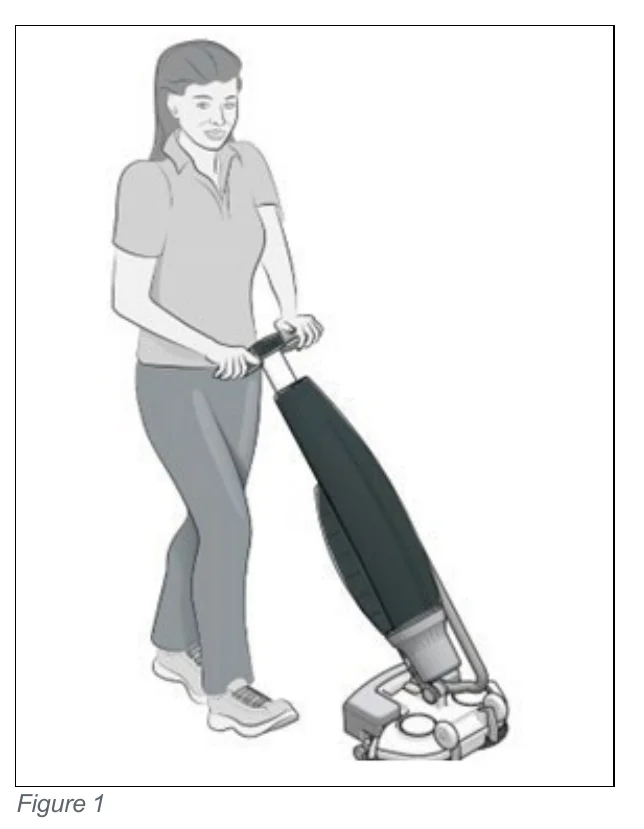
Drawing of a woman walking while pushing an upright i-mop Lite scrubbing machine with both hands on its handle, the scrub head on the floor in front of her
Figure 1
Source: Tennant i-mop Lite Operator Manual 9030350 Rev. 03 (02/2025), page 7, used with permission. SES ref PF-TOVA-5QLT‌‌​⁠⁠‍‍⁠​‍‍​​⁠‌⁠​​​‍​​​​​​‌⁠​​​‌​⁠​​⁠‍‍‌​​‍‍​‍​‍​‌⁠‌‌​⁠‍⁠‌⁠⁠
i-mop Lite 9030350 (03 (02/2025))Page 7 of 38
SAFETY

1.2. Non-intended use of the product

In short This section lists the ways the machine must not be used, such as near flammable materials, outdoors, or with unsuitable water and cleaning solutions. Misuse can endanger people and voids the warranty.‌‌​⁠⁠‍‍⁠​‍‍​​⁠‌⁠​​​‍​​​​​​‍​​​​‌​⁠​​‌‍​⁠​‌⁠‌‌‍​​‌​​​‌​⁠‍⁠⁠‍‌
WARNING Non-intended use can have consequences for the safety of operators and bystanders and will void the warranty on the product.
  • NEVER operate the i-mop® Lite near flammable dusts, liquids or vapors.
  • NEVER operate the i-mop® Lite when flammable or poisonous liquids like gasoline, oil, acids, or other volatile substances are on the floor.
  • DO NOT fill the i-mop® Lite with any flammable detergent. ONLY use the water-based cleaning solutions.
  • DO NOT use water that exceeds 113°F / 45°C. Using water warmer than this temperature will void the tank warranty.
  • DO NOT use cleaning solutions with a pH level below 3 or above 11 in order to prevent damage to sensitive components.
  • DO NOT use the i-mop® Lite outdoors or on uneven surfaces.
  • DO NOT operate this i-mop® Lite over electrical floor outlets in order to avoid electrical shock.
  • NO RIDERS! Do not carry passengers on top of the i-mop® Lite.
  • DO NOT use the i-mop® Lite as stepladder or platform.
  • DO NOT store the i-mop® Lite outside in order to avoid damage to electronic components.
  • ONLY use manufacturer-supplied parts for maintenance.
  • KEEP AWAY from children! The i-mop® Lite is a professional cleaning machine to be used by trained adults only.

1.3. Lifespan

In short The machine is guaranteed for at least 2000 hours of operation. Brushes and squeegee wear depending on the surface and need regular checks, and an authorized partner must inspect the machine every 500 hours.

Each i-mop® Lite is guaranteed to operate for at least 2000 hours. The wear on brushes and squeegee heavily depends on the roughness of the surface. They need to be checked regularly.‌‌​⁠⁠‍‍⁠​‍‍​​⁠‌⁠​​​‍​​​​​​‍​​​​‌​⁠​​‌‍​⁠​‌⁠‌‌‍​​‌​​​‌​⁠‍⁠⁠‍‌

CAUTION To ensure proper and safe operation throughout the life of the i-mop® Lite, the machine must be checked by an authorized i-team partner every 500 hours..

1.4. Modifications

In short Do not change the design of the machine without the manufacturer's consultation and permission, as this affects the warranty.

It is not permitted to make modifications to the design of the i-mop® Lite without consultation and permission from the manufacturer. This affects the warranty, see section 1.6 of this manual.

Source: Tennant i-mop Lite Operator Manual 9030350 Rev. 03 (02/2025), page 8, used with permission. SES ref PF-ESD3-FF4V‌‌​⁠⁠‍‍⁠​‍‍​​⁠‌⁠​​​‍​​​​​​‍​​​​‌​⁠​​‌‍​⁠​‌⁠‌‌‍​​‌​​​‌​⁠‍⁠⁠‍‌
i-mop Lite 9030350 (03 (02/2025))Page 8 of 38
Specifications

1.5. Specifications

In short This section gives the machine's dimensions, weight, battery details, tank capacities, brush data, noise and vibration values, and cleaning performance. It also lists which features the machine has, such as castor wheels and angle power cut off.‌‌​⁠⁠‍‍⁠​‍‍​​⁠‌⁠​​​‍​​​​​​‍‌​​​‌​⁠​​⁠​​‌‌‌‌​‍‍‌‌‍⁠‌⁠‍‍⁠‍⁠‍‍‍
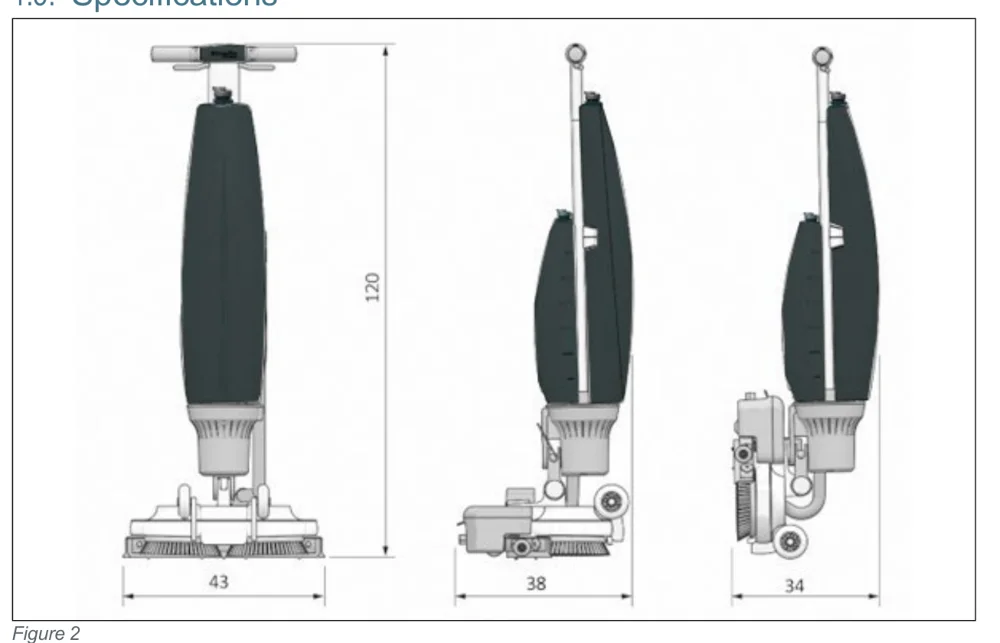
Three dimensioned views of the machine: front view with overall height 120 and width 43, side view in working position with depth 38, and side view in store position with depth 34, all in cm
Figure 2
ItemValue
Product size:120 x 43 x 38 cm | 47.24”x16.93”x 14.96”
Product size in store position:120 x 43 x 34 cm | 47.24”x16.93”x 13.38”
Weight (including Battery):12.5 kg | 27.56 lbs
Li-on battery:DC (18V, 12.48Ah, 250Wh) & 18V,14Ah,250Wh)
Battery capacity:1 Battery
Operation time of batteries:45 min (I power 12) & 60 minutes (I power 14)
Brush pressure:13 kg | 28.66 lbs
Brush speed:500 rpm
Solution tank capacity:3 L | 0.79 gallon
Recovery tank capacity:5 L / 3 L recommended max | 1.32/0.79 gallon
Vibration:Amplitude (mm) <= 0.5086
Velocity (m/s) <= 0.0068
Acceleration (m/s2) <= 1.435
Noise level (1m):68 Db
Theoretical performance:Up to 1400 m2 per hour | 15069 ft2 p/h
Practical performance:700 - 1000 m2 per hour | 7534-10763 ft2 p/h
Castor wheels:YES
Power cut off at store position:NO
Angle power cut off:YES < 32°
Hour counter:NO
Fluid Shortage Warning:NO
Source: Tennant i-mop Lite Operator Manual 9030350 Rev. 03 (02/2025), page 9, used with permission. SES ref PF-627F-TXIV‌‌​⁠⁠‍‍⁠​‍‍​​⁠‌⁠​​​‍​​​​​​‍‌​​​‌​⁠​​⁠​​‌‌‌‌​‍‍‌‌‍⁠‌⁠‍‍⁠‍⁠‍‍‍
i-mop Lite 9030350 (03 (02/2025))Page 9 of 38
INTRODUCTION

1.6. Warranty

In short The warranty applies only if the i-mop® Lite is used as intended and described in this manual. The installation/warranty report that comes with the machine must be filled out and sent to IPC.‌‌​⁠⁠‍‍⁠​‍‍​​⁠‌⁠​​​‍​​​​​​‍‍​​​‌​⁠​​⁠‍​​‌‌‍​‍​‍‌​⁠​​‍‌‌⁠‌​​​

The i-mop® Lite should be used as intended and described in this manual. Using the i-mop® Lite outside will void the warranty on the product.‌‌​⁠⁠‍‍⁠​‍‍​​⁠‌⁠​​​‍​​​​​​‍‍​​​‌​⁠​​⁠‍​​‌‌‍​‍​‍‌​⁠​​‍‌‌⁠‌​​​

Fill out the supplied machine installation/warranty report and send to IPC.

1.7. Identification

In short The ID tag with the serial number and production number is on the bar behind the wastewater tank. The tag identifies the serial number, production day and production year.

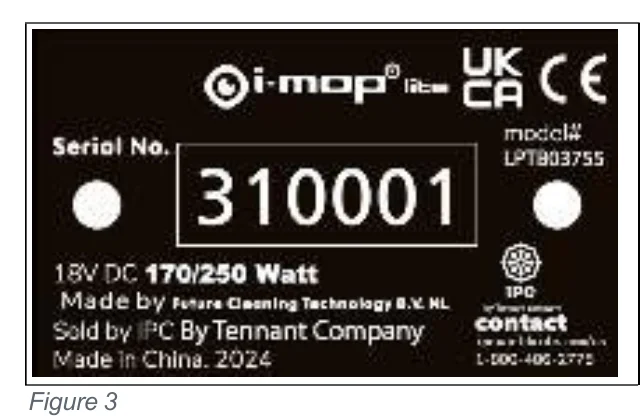
The ID tag, containing a serial number and production number, can be found on the bar behind the wastewater tank.

  1. Serial number
  2. Production day
  3. Production year
Black ID tag of the i-mop Lite showing the serial number field with 310001, the model number LPT803755, the rating 18V DC 170/250 Watt, and the manufacturer, seller and made in China 2024 lines, with UK CA and CE marks
Figure 3
Source: Tennant i-mop Lite Operator Manual 9030350 Rev. 03 (02/2025), page 10, used with permission. SES ref PF-TIQW-LQNP‌‌​⁠⁠‍‍⁠​‍‍​​⁠‌⁠​​​‍​​​​​​‍‍​​​‌​⁠​​⁠‍​​‌‌‍​‍​‍‌​⁠​​‍‌‌⁠‌​​​
i-mop Lite 9030350 (03 (02/2025))Page 10 of 38
Description

2. Description

In short This section describes the i-mop® Lite as a body and a scrub deck, and it can be folded into a store position, which is recommended for storage. Figure 4 and the legend identify the numbered parts of the machine.‌‌​⁠⁠‍‍⁠​‍‍​​⁠‌⁠​​​‍​​​​​​‍⁠​​​‌​⁠​​‌‌⁠‍​​‌⁠‍‌‍‌‍​⁠‍⁠⁠​‍‍‍‌‍

The compact i-mop® Lite consists of two main parts:‌‌​⁠⁠‍‍⁠​‍‍​​⁠‌⁠​​​‍​​​​​​‍⁠​​​‌​⁠​​‌‌⁠‍​​‌⁠‍‌‍‌‍​⁠‍⁠⁠​‍‍‍‌‍

  • The body that contains the motor, cleaning solution tank, recovery tank, handle with triggers and control panel.
  • The scrub deck that contains the brushes and squeegee.

The i-mop® Lite can be folded into a store position; this is recommended for storage.

The i-mop® Lite consists of:
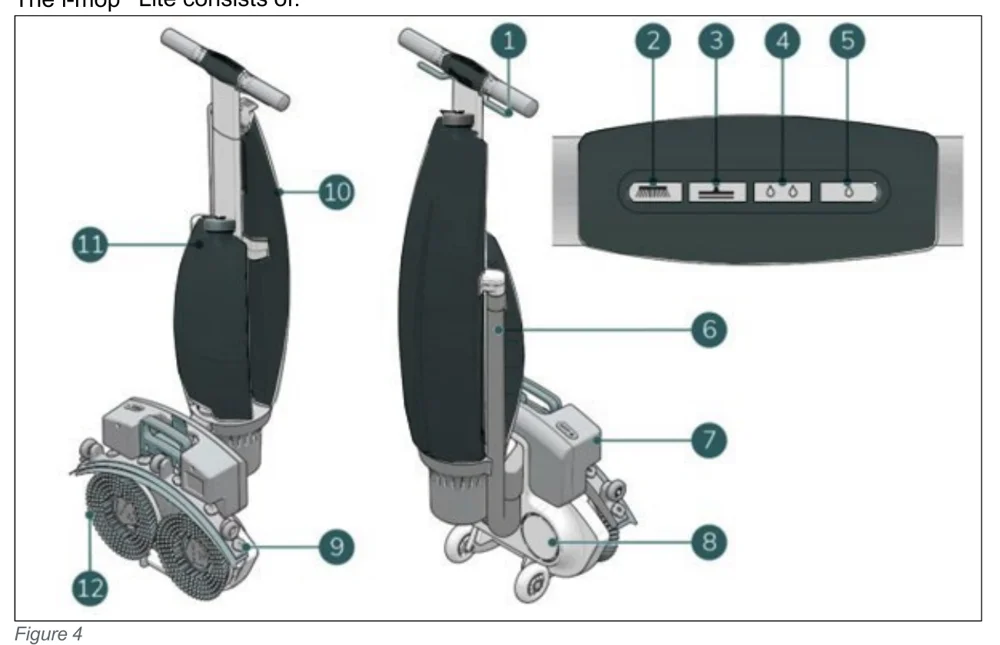
Views of the i-mop Lite from the front and side with numbered callouts 1 to 12: trigger on the handle, the four control panel buttons (brush on, vacuum on, high water level, low water level) shown in a close-up at upper right, vacuum hose, battery, scrub deck, squeegee, recovery tank, solution tank and rotating brushes
Figure 4

Legend

No.Item
1Trigger
2Control panel – Brush on
3Control panel – Vacuum on
4Control panel – High water level
5Control panel – Low water level
6Vacuum hose
7Battery
8Scrub deck
9Squeegee
10Recovery tank
11Solution tank
12Rotating brushes
Source: Tennant i-mop Lite Operator Manual 9030350 Rev. 03 (02/2025), page 11, used with permission. SES ref PF-GTIC-JJCJ‌‌​⁠⁠‍‍⁠​‍‍​​⁠‌⁠​​​‍​​​​​​‍⁠​​​‌​⁠​​‌‌⁠‍​​‌⁠‍‌‍‌‍​⁠‍⁠⁠​‍‍‍‌‍
i-mop Lite 9030350 (03 (02/2025))Page 11 of 38
Safety

3. Safety

In short This chapter tells operators to read the safety instructions before using the machine, because improper use can cause harm or void the manufacturer's warranty.‌‌​⁠⁠‍‍⁠​‍‍​​⁠‌⁠​​​‍​​​​​​⁠​​​​‌​⁠​​​⁠​‍‌​​‍​⁠⁠‌​‍​‍⁠​‍​‍‌​‌

Safety comes first. Therefore, please take your time to read and understand these safety instructions. Improper use can case cause harm or void the manufacturer’s warranty.‌‌​⁠⁠‍‍⁠​‍‍​​⁠‌⁠​​​‍​​​​​​⁠​​​​‌​⁠​​​⁠​‍‌​​‍​⁠⁠‌​‍​‍⁠​‍​‍‌​‌

3.1. General safety instructions

3.1.1 Sweep before scrub

Remove loose objects from the floor that can be propelled by or caught in the rotating brushes.

3.1.2 Brush condition

Make sure to check the condition of the brush before use. Change the brush only when the machine is turned off and in the stored position.

3.1.3 Machine orientation

Always keep the body of the i-mop® Lite in an upright position when inserting cleaning fluid or battery.

3.1.4 Antibacterial tanks

Always keep the antibacterial tanks of the i-mop® Lite out of direct sunlight. This can cause discoloration.

3.1.5 Strong magnets

CAUTION Please be aware of the integrated magnets that hold the fluid tanks in place and on the scrub deck.
Yellow triangular caution symbol showing a magnet, warning of strong integrated magnets
WARNING Operators and maintenance crew wearing pacemakers should keep a minimal distance of 6 in/15 cm.
Red prohibition symbol showing a pacemaker heart, warning that people with pacemakers must keep away

3.1.6 Battery

Always use the automatic battery charger provided by the manufacturer.

CAUTION During normal operation, the 18V battery cause no safety hazard on their own. Please adhere to the following safety instructions regarding the battery:
  • Do not crush, pierce or damage in any way.
  • Do not heat or incinerate.
  • Do not short-circuit.
  • Do not dismantle.
  • Keep dry.
  • Only charge between 5°C~40°C / 41°F~104°F.
  • Only use between 5°C~45°C / 41°F~113°F.

Yellow triangular caution symbol for battery hazard showing a liquid dripping on a hand
Source: Tennant i-mop Lite Operator Manual 9030350 Rev. 03 (02/2025), page 12, used with permission. SES ref PF-UT5O-QJQR‌‌​⁠⁠‍‍⁠​‍‍​​⁠‌⁠​​​‍​​​​​​⁠​​​​‌​⁠​​​⁠​‍‌​​‍​⁠⁠‌​‍​‍⁠​‍​‍‌​‌
i-mop Lite 9030350 (03 (02/2025))Page 12 of 38
SAFETY

3.2. Risks during operation

In short This section covers the risks while the machine is being used. Do not wear loose clothing or jewelry, mark the job site because the cleaning solution can make the floor slippery, and do not park the machine on ramps or slopes.‌‌​⁠⁠‍‍⁠​‍‍​​⁠‌⁠​​​‍​​​​​​⁠‌​​​‌​⁠​​⁠‌⁠⁠‌​​​‌⁠​​⁠​​‍⁠‌‍⁠​​‍‍

3.2.1 Dress safely

Do not wear a necktie, scarf, or any loose or dangling clothing or jewelry of any type while operating this i-mop® Lite. These types of clothing or jewelry could become tangled in rotating parts, causing serious injury or death.‌‌​⁠⁠‍‍⁠​‍‍​​⁠‌⁠​​​‍​​​​​​⁠‌​​​‌​⁠​​⁠‌⁠⁠‌​​​‌⁠​​⁠​​‍⁠‌‍⁠​​‍‍

3.2.2 Mark the job site

WARNING During operation the cleaning solution can cause slippery patches on the floor. Therefore, it is advised to mark the job site with a wet floor marker to warn passersby.

3.2.3 Careful when parking

Do not park the i-mop® Lite on ramps or slopes. Always park the i-mop® Lite on a level, hard surface.

3.3. Risks after operation

In short This section covers the risks once work is finished. Remove the battery before cleaning, maintenance or storage, keep the machine body in the stored position when changing brushes or squeegee, and store it on a level, hard surface.

3.3.1 Remove battery

Remove the battery before executing any cleaning or maintenance task, or before storage.

3.3.2 Machine orientation

Always keep the body of the i-mop® Lite in the stored position when replacing brushes or squeegee. (See section 4.2 store position)

3.3.3 Careful when storing

Do not store the i-mop® Lite on ramps or slopes. Always store the i-mop® Lite on a level, hard surface. Always store the i-mop® Lite with scrub deck in the stored position.

Source: Tennant i-mop Lite Operator Manual 9030350 Rev. 03 (02/2025), page 13, used with permission. SES ref PF-3IOL-B6NG‌‌​⁠⁠‍‍⁠​‍‍​​⁠‌⁠​​​‍​​​​​​⁠‌​​​‌​⁠​​⁠‌⁠⁠‌​​​‌⁠​​⁠​​‍⁠‌‍⁠​​‍‍
i-mop Lite 9030350 (03 (02/2025))Page 13 of 38
Transport and storage

4. Transport and storage

4.1. General

In short This section covers how to handle the machine before storage or transport. Keep the body upright when filling the cleaning solution tank or inserting the battery, and drain the machine and remove the battery after each use.‌‌​⁠⁠‍‍⁠​‍‍​​⁠‌⁠​​​‍​​​​​​⁠‍​​​‌​⁠​​‍‍‍​⁠‌‍‍​⁠‌‌‌⁠‌⁠⁠​​⁠‍‍⁠​
CAUTION Always keep the body of the i-mop® Lite in an upright position when filling the cleaning solution tank or inserting the battery.

Before storage or transport, drain the machine and remove the battery after each use.‌‌​⁠⁠‍‍⁠​‍‍​​⁠‌⁠​​​‍​​​​​​⁠‍​​​‌​⁠​​‍‍‍​⁠‌‍‍​⁠‌‌‌⁠‌⁠⁠​​⁠‍‍⁠​

4.2. Store position

In short The store position is the upright vertical position used for storage and maintenance, and it disables power to the machine. To get there, push the vacuum hose back in, hold the handle and scrub deck, lift the deck until it stands on the front wheels, then guide the body to it until it snaps into a resting position.
CAUTION Please be aware of the integrated magnet on the scrub deck.

The store position is the upright vertical position for storage and maintenance tasks.
The store position will disable the power to the machine.
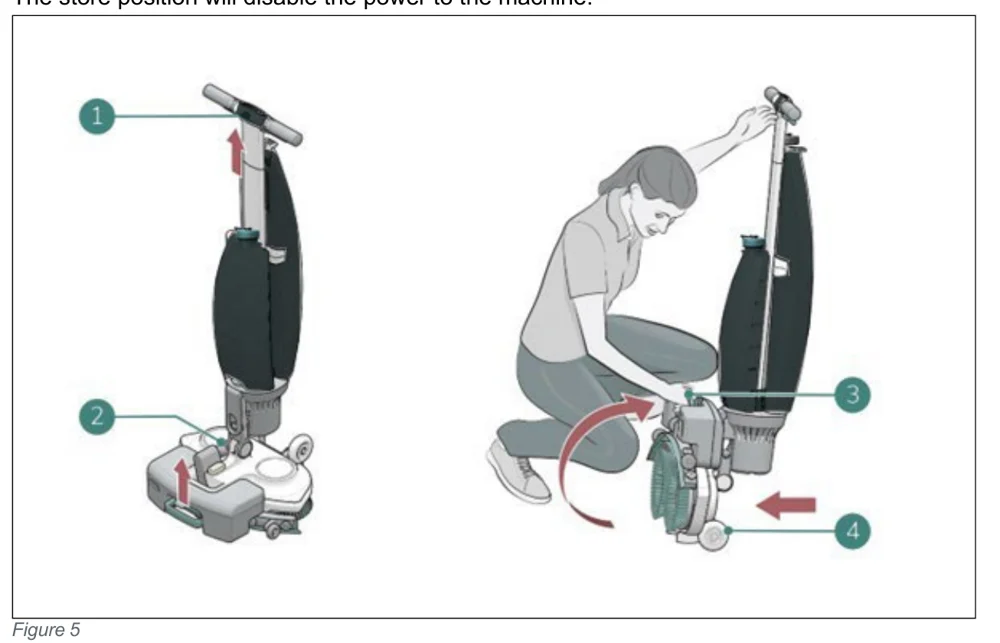
Two views of the i-mop Lite being put into store position. Left: machine upright with callout 1 on the handle with an upward arrow, and callout 2 on the vacuum hose at the scrub deck with an upward arrow. Right: a person crouching, holding the handle (1) with one hand and lifting the scrub deck (3) with the other, with a curved arrow showing the deck rotating up and callout 4 at the front wheel with an arrow pointing toward it
Figure 5
  1. Make sure the vacuum hose (Figure 5, pos 2) is pushed back into the machine so it cannot get squeezed.
  2. Crouch down and hold the handle (Figure 5, pos 1) with one hand while holding the scrub deck (Figure 5, pos 3) with your other hand.
  3. Lift the scrub deck slowly until it stands upright on the front wheels (Figure 5, pos 4). Guide the body towards the scrub deck until it snaps into a resting position.
Source: Tennant i-mop Lite Operator Manual 9030350 Rev. 03 (02/2025), page 14, used with permission. SES ref PF-VQGZ-64FV‌‌​⁠⁠‍‍⁠​‍‍​​⁠‌⁠​​​‍​​​​​​⁠‍​​​‌​⁠​​‍‍‍​⁠‌‍‍​⁠‌‌‌⁠‌⁠⁠​​⁠‍‍⁠​
i-mop Lite 9030350 (03 (02/2025))Page 14 of 38
Transport

4.3. Transport outside

In short This section explains how to move the i-mop Lite outdoors. Put it in store position and carry it with one hand while holding the handle with your other hand, rather than rolling it on its transport wheels.‌‌​⁠⁠‍‍⁠​‍‍​​⁠‌⁠​​​‍​​​​​​⁠⁠​​​‌​⁠​​⁠​‌‍‌​⁠‌​⁠‍‍⁠⁠‌⁠​⁠⁠​‌⁠‌⁠
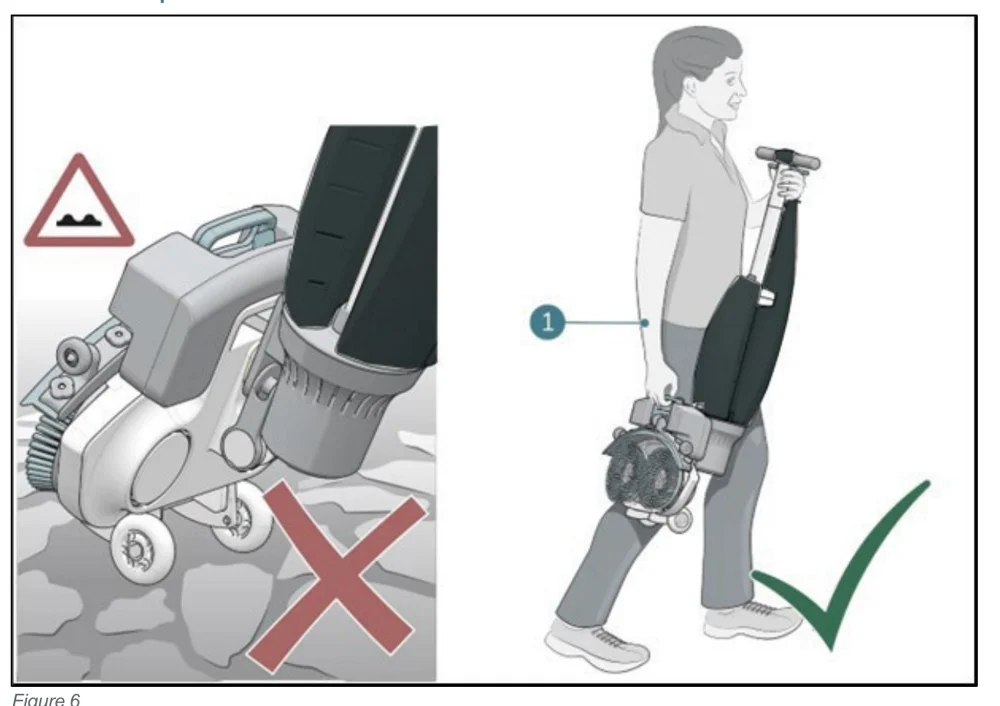
Two panels. Left: the i-mop Lite being rolled on its transport wheels over rough, sandy ground, with a warning triangle for an uneven surface and a red X marking it as wrong. Right: a person carrying the i-mop Lite in store position with one hand while holding the handle with the other, with callout 1 pointing to the handle and a green check mark showing the correct way.
Figure 6

When outside:‌‌​⁠⁠‍‍⁠​‍‍​​⁠‌⁠​​​‍​​​​​​⁠⁠​​​‌​⁠​​⁠​‌‍‌​⁠‌​⁠‍‍⁠⁠‌⁠​⁠⁠​‌⁠‌⁠

  1. Put the i-mop® Lite in store position, see section 4.2.
  2. Carry the i-mop® Lite with one hand while holding the handle (Figure 6, pos 1) with your other hand.
CAUTION The transport wheels are not designed to roll over dirty surfaces, sand can cause the wheels to block. Lift the i-mop® Lite while moving it from one building to another.
Source: Tennant i-mop Lite Operator Manual 9030350 Rev. 03 (02/2025), page 15, used with permission. SES ref PF-BEQX-6UJV‌‌​⁠⁠‍‍⁠​‍‍​​⁠‌⁠​​​‍​​​​​​⁠⁠​​​‌​⁠​​⁠​‌‍‌​⁠‌​⁠‍‍⁠⁠‌⁠​⁠⁠​‌⁠‌⁠
i-mop Lite 9030350 (03 (02/2025))Page 15 of 38
TRANSPORT

4.4. Transport in a vehicle

In short This section explains how to carry the i-mop® Lite in a vehicle, upright and safely secured, or in a car trunk. Empty and remove the tanks and battery, put the machine in store position, and secure it with a tension belt or other restraint.‌‌​⁠⁠‍‍⁠​‍‍​​⁠‌⁠​​​‍​​​​​‌​​​​​‌​⁠​​⁠‍​​‌‍‌‌⁠‍‌‌⁠​‍‍⁠‍​‌⁠⁠‍‌

The preferred way to transport your i-mop® Lite is in an upright position and safely secured.‌‌​⁠⁠‍‍⁠​‍‍​​⁠‌⁠​​​‍​​​​​‌​​​​​‌​⁠​​⁠‍​​‌‍‌‌⁠‍‌‌⁠​‍‍⁠‍​‌⁠⁠‍‌

  1. Make sure both tanks are empty.
  2. Put the i-mop® Lite in store position, see section 4.2.
  3. Remove the batteries.
  4. Lift the i-mop® Lite into the vehicle.
  5. Secure the i-mop® using a tension belt or another appropriate restraint (Figure 7, pos 1).
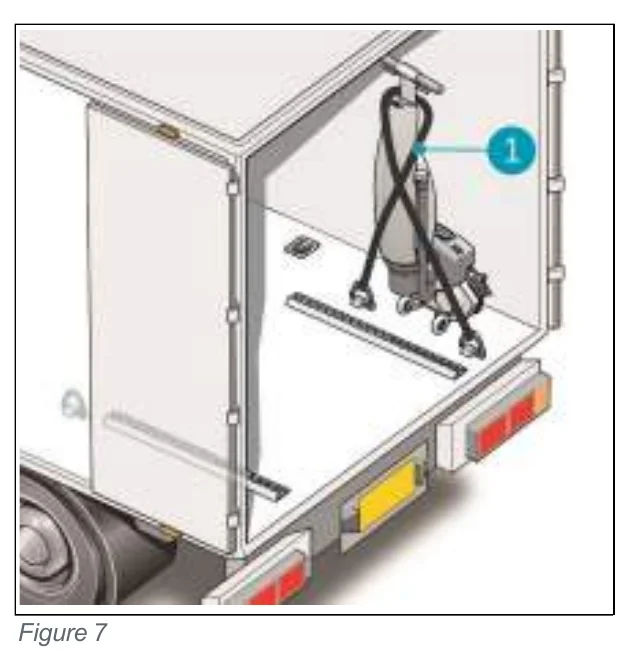
Open rear of a delivery vehicle with the i-mop Lite standing upright inside, held by crossed tension belts; callout 1 points to the belts
Figure 7

The i-mop® Lite is a compact machine and fits in the trunk of your car. Before loading the i-mop® Lite into your vehicle, make sure both tanks and the battery are removed or leave it as it is.

  1. Put the i-mop® Lite in store position, see section 4.2.
  2. Remove the battery and both tanks.
  3. Set the i-mop® Lite into a vertical/store position.
  4. Prevent the i-mop® Lite from moving around during transport by using a tension belt or another appropriate restraint.
CAUTION The seal of the solution and recovery tank can be damaged during transport in horizontal position. Make sure you remove the tanks before loading the machine into your car. Improper use will void the warranty.
Source: Tennant i-mop Lite Operator Manual 9030350 Rev. 03 (02/2025), page 16, used with permission. SES ref PF-3O7U-EI5F‌‌​⁠⁠‍‍⁠​‍‍​​⁠‌⁠​​​‍​​​​​‌​​​​​‌​⁠​​⁠‍​​‌‍‌‌⁠‍‌‌⁠​‍‍⁠‍​‌⁠⁠‍‌
i-mop Lite 9030350 (03 (02/2025))Page 16 of 38
Assembly and installation

5. Assembly and installation

In short The i-mop® Lite needs little assembly; the main job is attaching the brushes and squeegee. The unboxing list shows what comes in the box.‌‌​⁠⁠‍‍⁠​‍‍​​⁠‌⁠​​​‍​​​​​‌​‌​​​‌​⁠​​‌​‌‌⁠⁠​‍‍​​⁠⁠​‍‌‍​‌‌​⁠⁠‍

The i-mop® Lite does not require much assembly. Most importantly, you will have to attach the brushes and squeegee.‌‌​⁠⁠‍‍⁠​‍‍​​⁠‌⁠​​​‍​​​​​‌​‌​​​‌​⁠​​‌​‌‌⁠⁠​‍‍​​⁠⁠​‍‌‍​‌‌​⁠⁠‍

5.1. Unboxing

The i-mop® Lite body is packed in a single box. The battery and charger are delivered in a separate box within this packaging and can be ordered separately.
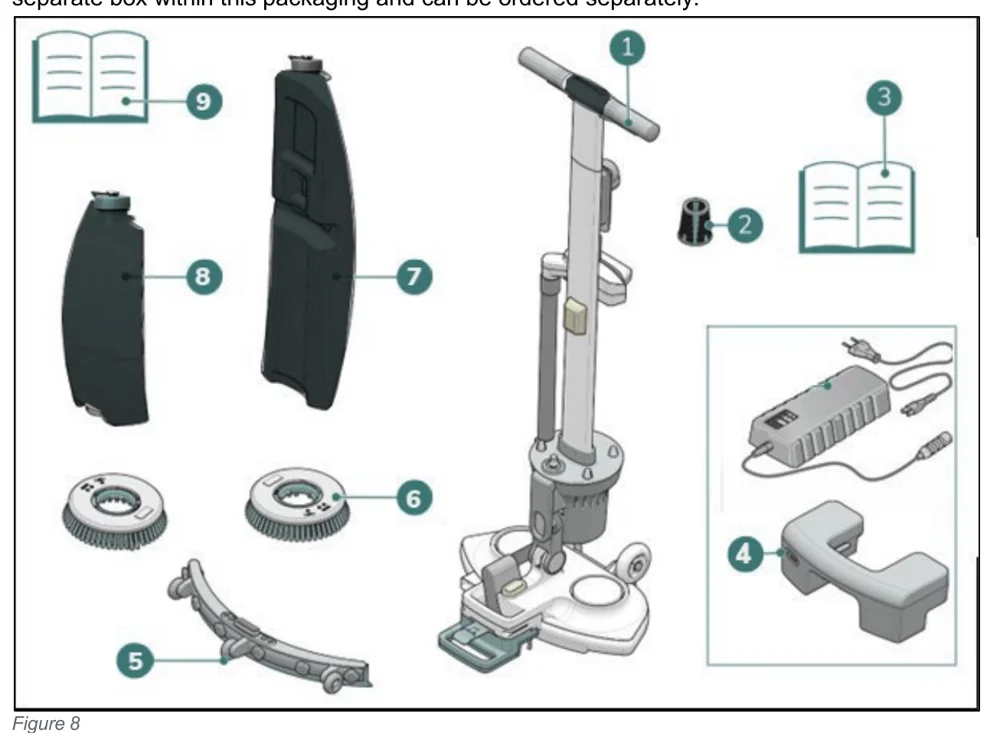
Unboxing contents of the i-mop Lite with numbered callouts 1 to 9: main body with handle (1), suction filter (2), battery charger manual (3), battery charger and battery (4), squeegee assembly (5), two brushes (6), recovery tank (7), cleaning solution tank (8) and this manual (9)
Figure 8
  1. 1x i-mop® Lite main body
  2. 1x suction filter
  3. 1x battery charger manual
  4. 1x battery charger
    1x battery
  5. 1x squeegee assembly
  6. 2x brushes
  7. 1x recovery tank
  8. 1x cleaning solution tank
  9. 1x this manual
Source: Tennant i-mop Lite Operator Manual 9030350 Rev. 03 (02/2025), page 17, used with permission. SES ref PF-WVXK-4TGD‌‌​⁠⁠‍‍⁠​‍‍​​⁠‌⁠​​​‍​​​​​‌​‌​​​‌​⁠​​‌​‌‌⁠⁠​‍‍​​⁠⁠​‍‌‍​‌‌​⁠⁠‍
i-mop Lite 9030350 (03 (02/2025))Page 17 of 38
ASSEMBLY

5.2. Assembly

5.2.1 Charging the battery

In short This section tells you to charge the battery by following the battery charger manual and to keep it charged regularly.‌‌​⁠⁠‍‍⁠​‍‍​​⁠‌⁠​​​‍​​​​​‌​‍​​​‌​⁠​​‌‌​‌‌​‍‍‌⁠​‌​‍‌‌​⁠‍‍‍‍‍‍

Batteries and chargers: make sure your charger is compatible with your batteries, and set its charging algorithm to your battery pack before you use it.

Charge the battery according to the instructions in the battery charger manual. Make sure the battery is charged regularly.‌‌​⁠⁠‍‍⁠​‍‍​​⁠‌⁠​​​‍​​​​​‌​‍​​​‌​⁠​​‌‌​‌‌​‍‍‌⁠​‌​‍‌‌​⁠‍‍‍‍‍‍

5.2.2 Attaching the brushes

In short This section shows how to fit the left and right brushes onto the motor disks. Put the machine in store position, align each brush with its disk, push it on, then turn it until the disk turns and the brush is in place.
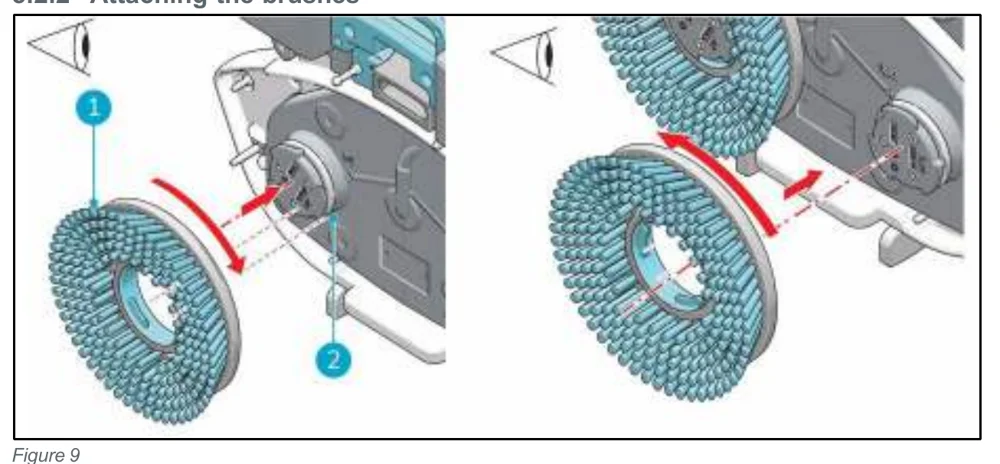
Two views of the scrub deck showing how the brushes attach. Left view: the left brush (callout 1) is lined up with the left motor disk (callout 2), with a red arrow pushing the brush on and a curved arrow showing the turning direction. Right view: the right brush is lined up with the right motor disk, with arrows showing the push and the opposite turn.
Figure 9

To attach the brushes:

  1. Put the i-mop® Lite in store position, see section 4.2.
  2. Hold the scrub deck firmly with one hand.
  3. Align the left brush (Figure 9, pos 1) with the left motor disk (Figure 9, pos 2). Align the latches and cut-outs in the brush and motor disk.
  4. Push the brush on the motor disk.
  5. Turn the left brush clockwise until you see the motor disk turning. The brush is now in place.
  6. Align the right brush with the right motor disk. Align the latches and cut-outs in the brush and motor disk.
  7. Push the brush on the motor disk.
  8. Turn the right brush anticlockwise until you see the motor disk turning. The brush is now in place.
Source: Tennant i-mop Lite Operator Manual 9030350 Rev. 03 (02/2025), page 18, used with permission. SES ref PF-E5UQ-6RLR‌‌​⁠⁠‍‍⁠​‍‍​​⁠‌⁠​​​‍​​​​​‌​‍​​​‌​⁠​​‌‌​‌‌​‍‍‌⁠​‌​‍‌‌​⁠‍‍‍‍‍‍
i-mop Lite 9030350 (03 (02/2025))Page 18 of 38
ASSEMBLY

5.2.3 Attaching the squeegee

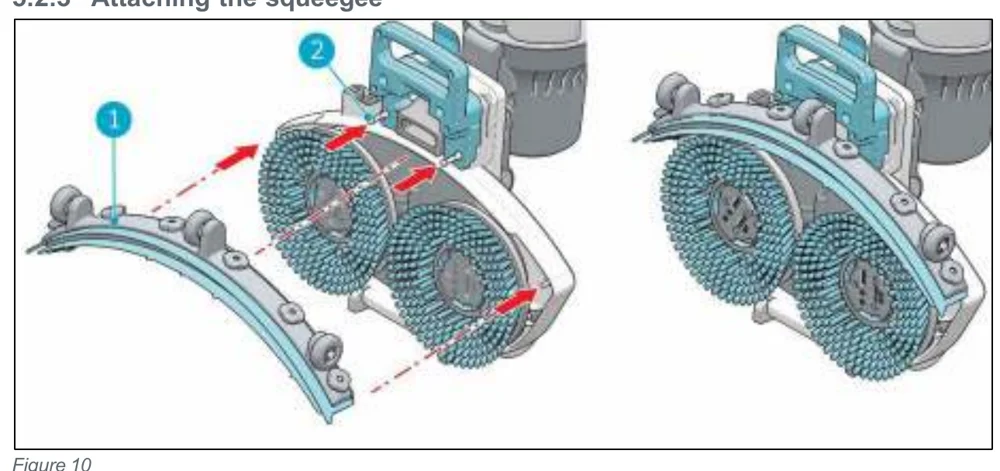
In short This section shows how to fit the squeegee onto the scrub deck. Hold the deck, line up the pins with the holes, then push in the left and right sides.‌‌​⁠⁠‍‍⁠​‍‍​​⁠‌⁠​​​‍​​​​​‌​⁠​​​‌​⁠​​‍​‍‌​‌‌‌‌‍⁠‌⁠‌‌‍‌‍​​⁠⁠‍⁠
Two views of the scrub deck with two round brushes. At left the curved squeegee (callout 1) is held apart, with dash-dot lines and red arrows showing it moving onto the deck's pins (callout 2). At right the squeegee is fitted in place on the deck.
Figure 10

To attach the squeegee:‌‌​⁠⁠‍‍⁠​‍‍​​⁠‌⁠​​​‍​​​​​‌​⁠​​​‌​⁠​​‍​‍‌​‌‌‌‌‍⁠‌⁠‌‌‍‌‍​​⁠⁠‍⁠

  1. Hold the scrub deck firmly with one hand.
  2. Align the pins on the scrub deck (Figure 10, pos 2) with the holes on the squeegee (Figure 10, pos 1).
  3. Push the left side of the squeegee in place.
  4. Push the right side of the squeegee in place.

5.2.4 Installing the cleaning solution tank

In short This section covers putting the cleaning solution tank onto the i-mop Lite. Set it on valve first, press down on the nipple to open the valve seal, then push it forward until the magnet holds it.
  1. Put the tank (Figure 11, pos 1) on the i-mop® Lite with the valve first.
  2. Press the tank downward on the nipple (Figure 11, pos 3) to open the valve seal.
  3. Push the tank forward into place, the magnet (Figure 11, pos 2) will lock the solution tank in place.
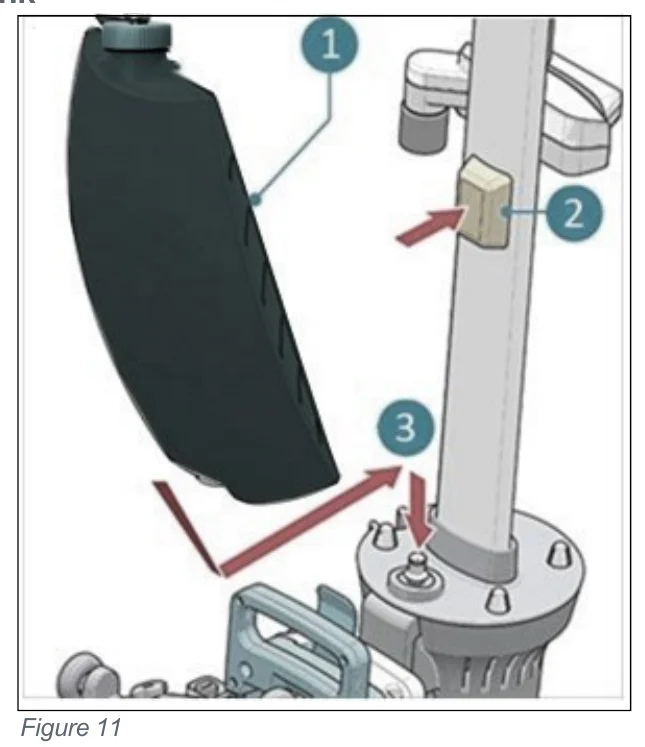
Cleaning solution tank (callout 1) being placed onto the i-mop Lite handle tube. Callout 2 and a red arrow mark the magnet that locks the tank, callout 3 and arrows mark the nipple the tank is pressed down on and pushed forward.
Figure 11
Source: Tennant i-mop Lite Operator Manual 9030350 Rev. 03 (02/2025), page 19, used with permission. SES ref PF-3JKS-64SB‌‌​⁠⁠‍‍⁠​‍‍​​⁠‌⁠​​​‍​​​​​‌​⁠​​​‌​⁠​​‍​‍‌​‌‌‌‌‍⁠‌⁠‌‌‍‌‍​​⁠⁠‍⁠
i-mop Lite 9030350 (03 (02/2025))Page 19 of 38
OPERATION

5.2.5 Installing the recovery tank

In short This section explains how to put the recovery tank back on the machine. You set the tank on with the bottom first, seat it on the nipples, and push it into place so the magnet holds it.‌‌​⁠⁠‍‍⁠​‍‍​​⁠‌⁠​​​‍​​​​​‌‌​​​​‌​⁠​​⁠‍‍‍​⁠​‍⁠​‌​‍‍​⁠⁠​‍⁠‌‌‍⁠
  1. Put the tank (Figure 12, pos 1) on the i-mop® Lite with the bottom first.
  2. Position the tank on the nipples.
  3. Push the tank in place, the magnet will lock the recovery tank in place.
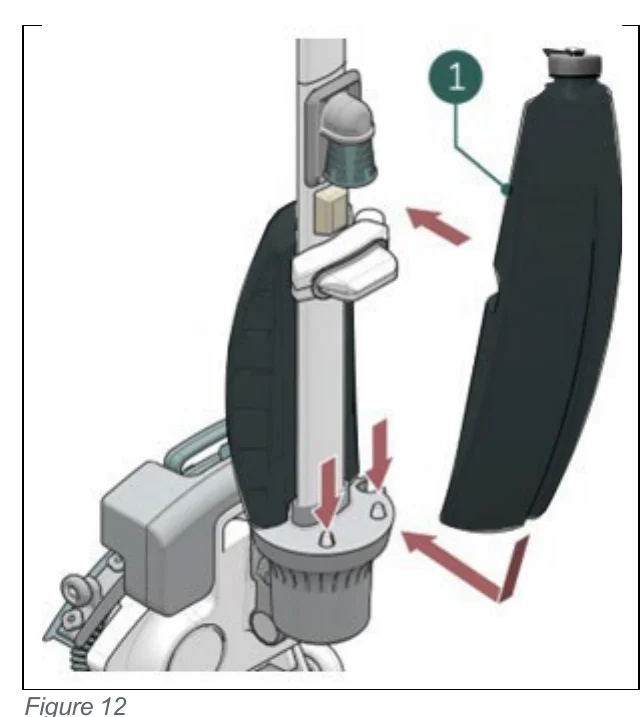
Recovery tank being installed on the i-mop Lite: the tank, marked with callout 1, sits beside the machine's vertical column, with red arrows showing it being moved toward the machine bottom first and pushed down onto the nipples at the base
Figure 12
Source: Tennant i-mop Lite Operator Manual 9030350 Rev. 03 (02/2025), page 20, used with permission. SES ref PF-4OTE-AXOS‌‌​⁠⁠‍‍⁠​‍‍​​⁠‌⁠​​​‍​​​​​‌‌​​​​‌​⁠​​⁠‍‍‍​⁠​‍⁠​‌​‍‍​⁠⁠​‍⁠‌‌‍⁠
i-mop Lite 9030350 (03 (02/2025))Page 20 of 38
Operation

6. Operation

6.1. Before you start

In short Before using the machine, check the brushes and squeegee for wear and tear. To insert the battery, put the machine in store position and push the battery into its slot until it clicks.‌‌​⁠⁠‍‍⁠​‍‍​​⁠‌⁠​​​‍​​​​​‌‌‌​​​‌​⁠​​​‍⁠​⁠⁠⁠​​‍⁠‌‍​‌‌‍⁠​⁠‌‍‌⁠

Check the brushes and squeegee for wear and tear, see chapter 7 for maintenance instructions.‌‌​⁠⁠‍‍⁠​‍‍​​⁠‌⁠​​​‍​​​​​‌‌‌​​​‌​⁠​​​‍⁠​⁠⁠⁠​​‍⁠‌‍​‌‌‍⁠​⁠‌‍‌⁠

6.1.1 Inserting the battery

CAUTION Only use i-power® batteries specifically designed for use in i-mop® devices.
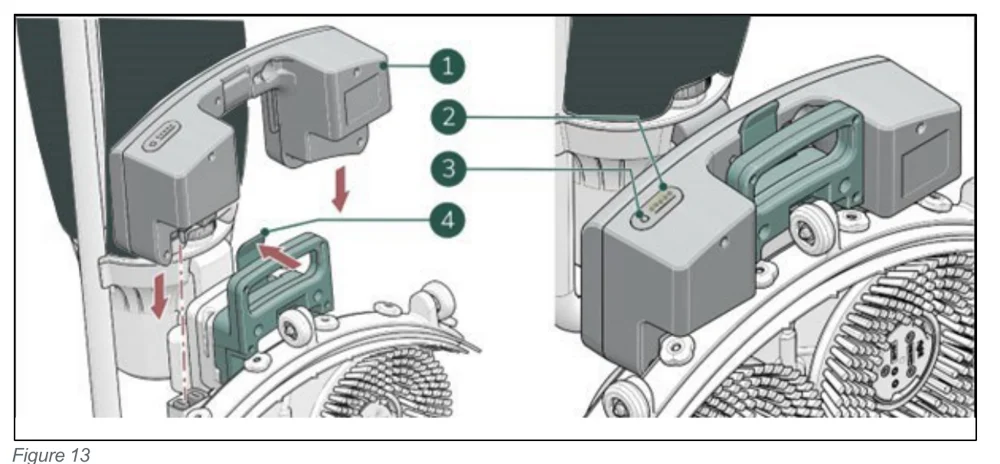
Two views of the i-mop Lite battery area. On the left the battery (1) is lifted above its slot with downward arrows, and the retaining clip (4) is shown with an arrow. On the right the battery is seated, with the power level lights (2) and the power indicator button (3) marked.
Figure 13
  1. Put the i-mop® Lite in store position, see section 4.2.
  2. Push the battery (Figure 13, pos 1) in the battery slot. A click indicates that the battery is locked in place by the retaining clip (Figure 13, pos 4).
  3. During operation, you can check the amount of power left (Figure 13, pos 2) by pressing the power indicator (Figure 13, pos 3) on the battery.
Source: Tennant i-mop Lite Operator Manual 9030350 Rev. 03 (02/2025), page 21, used with permission. SES ref PF-FT64-PFLG‌‌​⁠⁠‍‍⁠​‍‍​​⁠‌⁠​​​‍​​​​​‌‌‌​​​‌​⁠​​​‍⁠​⁠⁠⁠​​‍⁠‌‍​‌‌‍⁠​⁠‌‍‌⁠
i-mop Lite 9030350 (03 (02/2025))Page 21 of 38
OPERATION

6.1.2 Filling the cleaning solution tank

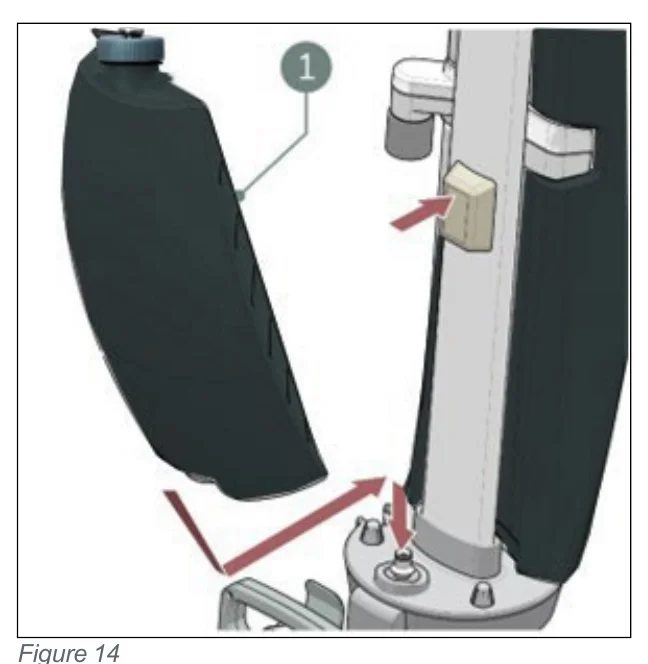
In short This procedure explains how to fill the cleaning solution tank and put it back on the machine. Pour in no more than 0.79 gal/ 3 L of cleaning fluid, close the cap tightly, then seat the tank valve first until the magnet locks it.‌‌​⁠⁠‍‍⁠​‍‍​​⁠‌⁠​​​‍​​​​​‌‌‍​​​‌​⁠​​‍‍⁠​‌​⁠‌‌‍⁠‌‌‌‍‍​‍‌‍‍​‌​
  1. Remove the cap on the tank.
  2. Pour in a maximum of 0.79 gal/ 3 L of cleaning fluid.
  3. Replace cap and make sure it seals tightly.
  4. Put the i-mop® Lite in store position, see section 4.2.
  5. Put the tank on the i-mop® Lite with the valve first (Figure 14, pos 1).
  6. Press the tank downward to break the valve seal.
  7. Push the tank in place, the magnet will lock the solution tank in place.
  8. Clean your hands afterwards.
Solution tank being placed onto the i-mop Lite handle tube, with callout 1 pointing to the tank valve at the bottom and red arrows showing the tank moving toward the machine and pressing downward, and a red arrow pointing at the magnet on the tube
Figure 14
Source: Tennant i-mop Lite Operator Manual 9030350 Rev. 03 (02/2025), page 22, used with permission. SES ref PF-PISF-YND7‌‌​⁠⁠‍‍⁠​‍‍​​⁠‌⁠​​​‍​​​​​‌‌‍​​​‌​⁠​​‍‍⁠​‌​⁠‌‌‍⁠‌‌‌‍‍​‍‌‍‍​‌​
i-mop Lite 9030350 (03 (02/2025))Page 22 of 38
OPERATION

6.2. Operation procedure

6.2.1 Walking to the job site
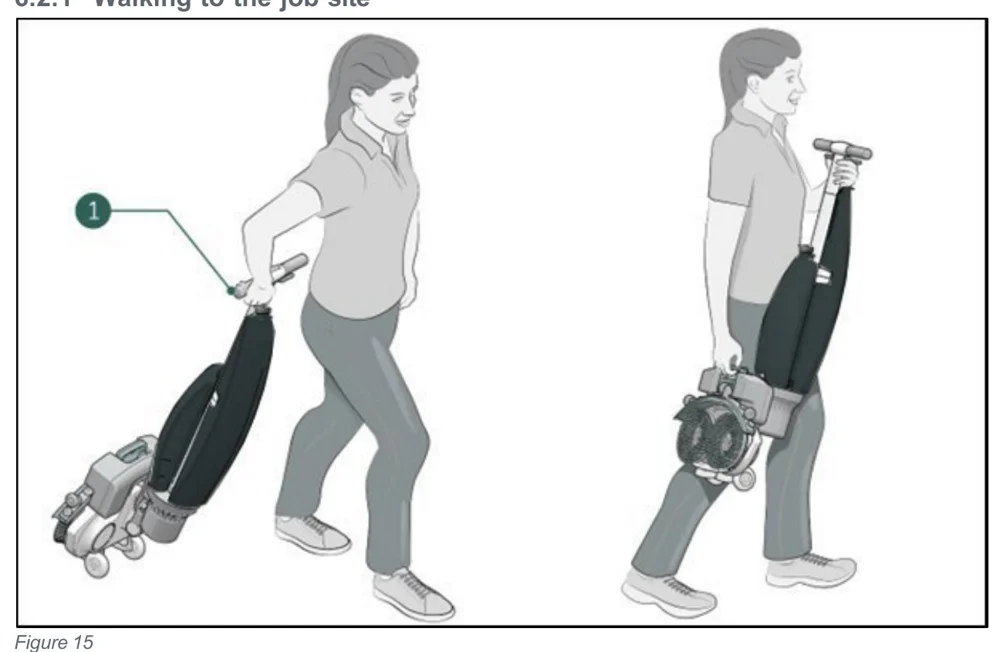
In short This part explains how to move the i-mop Lite from one location to another inside a building. Put the machine in store position, hold the handle with one hand, and use two hands to lift it over obstacles.‌‌​⁠⁠‍‍⁠​‍‍​​⁠‌⁠​​​‍​​​​​‌‌⁠​​​‌​⁠​​‍​⁠‍‍​​‌‌⁠⁠​‌⁠⁠‍‍‍‌‍⁠‌⁠‌
Two drawings of a woman carrying the folded i-mop Lite. On the left she pulls it along the floor, holding the handle with one hand, marked with callout 1. On the right she carries it lifted off the floor, holding the handle with one hand and the scrub deck with the other.
Figure 15

To move the i-mop® Lite from one location to another one in a building:‌‌​⁠⁠‍‍⁠​‍‍​​⁠‌⁠​​​‍​​​​​‌‌⁠​​​‌​⁠​​‍​⁠‍‍​​‌‌⁠⁠​‌⁠⁠‍‍‍‌‍⁠‌⁠‌

  1. Put the i-mop® Lite in store position, see section 4.2.
  2. Hold the handle with one hand (Figure 15, pos 1).
  3. Don't forget to bring a wet floor marker.
  4. Walk slowly and pay extra attention if you pull the i-mop® Lite over obstacles.
  5. To lift the i-mop® Lite over obstacles, always use two hands.
    • Hold the handle with one hand.
    • Lift the scrub deck with the other hand.
Source: Tennant i-mop Lite Operator Manual 9030350 Rev. 03 (02/2025), page 23, used with permission. SES ref PF-C7FM-XK47‌‌​⁠⁠‍‍⁠​‍‍​​⁠‌⁠​​​‍​​​​​‌‌⁠​​​‌​⁠​​‍​⁠‍‍​​‌‌⁠⁠​‌⁠⁠‍‍‍‌‍⁠‌⁠‌
i-mop Lite 9030350 (03 (02/2025))Page 23 of 38
OPERATION

6.2.2 At the job site

In short This part explains how to lower the scrub deck to the floor at the job site. Mark the area, hold the scrub deck with one hand, push the handle forward with the other, and lower the deck slowly, which enables power to the machine.‌‌​⁠⁠‍‍⁠​‍‍​​⁠‌⁠​​​‍​​​​​‌‍​​​​‌​⁠​​‌‌​‌​‌⁠⁠‍⁠‌⁠‍​⁠‍‍⁠​⁠⁠​⁠⁠
  1. Mark the job site using a wet floor marker.
  2. Crouch down while holding the scrub deck firmly with one hand (Figure 16, pos 2).
  3. Push the handle forward with your other hand (Figure 16, pos 1).
  4. Bring the scrub deck slowly down to the floor. This will enable power to the machine.
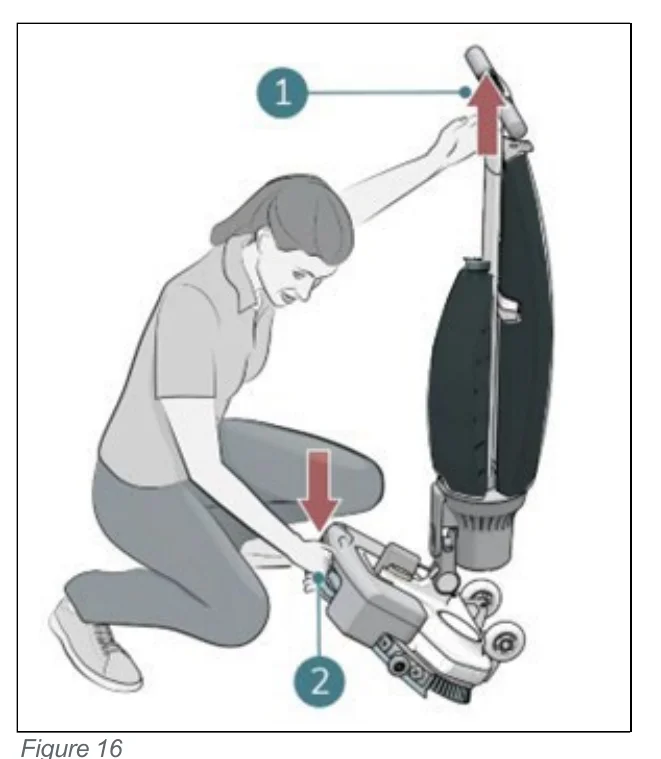
A person crouching beside the upright machine, holding the scrub deck with one hand at callout 2 and pushing the handle forward with the other hand at callout 1; arrows show the handle moving forward and the scrub deck being lowered to the floor
Figure 16
WARNING Never push down the scrub deck with your foot.
Source: Tennant i-mop Lite Operator Manual 9030350 Rev. 03 (02/2025), page 24, used with permission. SES ref PF-ADB6-MYHB‌‌​⁠⁠‍‍⁠​‍‍​​⁠‌⁠​​​‍​​​​​‌‍​​​​‌​⁠​​‌‌​‌​‌⁠⁠‍⁠‌⁠‍​⁠‍‍⁠​⁠⁠​⁠⁠
i-mop Lite 9030350 (03 (02/2025))Page 24 of 38
OPERATION
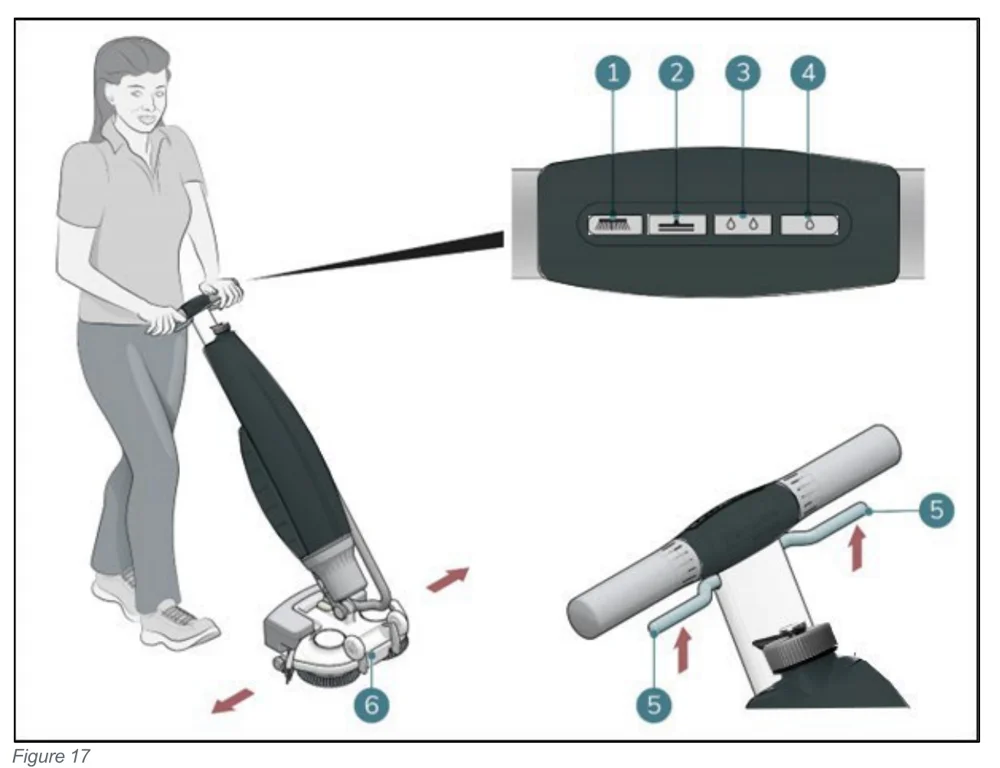
A woman stands behind the i-mop Lite holding the handle, with arrows showing the scrub deck moving left and right and callout 6 on the scrub deck. An enlarged view of the handle control panel shows four buttons numbered 1 to 4, and a second enlarged view of the handle shows the trigger levers numbered 5 with arrows pointing up.
Figure 17
  1. Stand behind the i-mop® Lite. Choose your cleaning mode via the buttons on the control panel (Figure 17, pos 1 to 4). You can select the options independently or combined.
ModePress
Brush onlyBrush button
Vacuum onlyVacuum button
Use cleaning solutionCleaning solution button
Use Eco modeEco button
Brush and cleaning solutionBrush button and cleaning solution button
Brush and cleaning solution and vacuumBrush, vacuum and cleaning solution buttons
Brush and Eco and vacuumBrush, vacuum and Eco buttons
  1. Hold the handle with both hands.
  2. Squeeze the trigger on the handle (Figure 17, pos 5). This will also start the i-mop® Lite
  3. Once the trigger is squeezed the i-mop® Lite will move forward.
  4. Walk behind the i-mop® Lite.
  5. Steer by gently turning the handle left or right to move the scrub deck (Figure 17, pos 6).
  6. Releasing the trigger (Figure 17, pos 5) will immediately stop the i-mop® Lite. The vacuum motor will stop after 3 seconds.
Source: Tennant i-mop Lite Operator Manual 9030350 Rev. 03 (02/2025), page 25, used with permission. SES ref PF-LVKR-3ZBK‌‌​⁠⁠‍‍⁠​‍‍​​⁠‌⁠​​​‍​​​​​‌‍‌​​​‌​⁠​​⁠‌​‌⁠‍‍‍⁠‌​‍​​‍​‍⁠‌‌​​‌‍
i-mop Lite 9030350 (03 (02/2025))Page 25 of 38
OPERATION
TIP: Learn to swivel
Operating the i-mop® Lite is very intuitive and like steering a bicycle. The i-mop® Lite is designed to move forward. To turn, stop walking and use your inside hand (the hand in the direction you want to go to) to turn the handle. The i-mop® Lite can swivel 360 degrees making it possible to reverse direction.
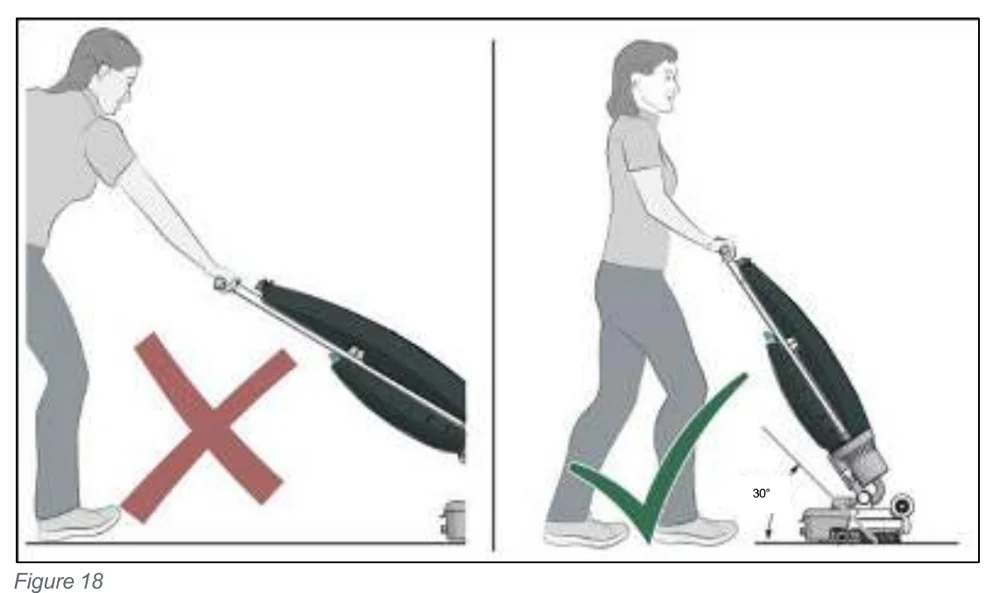
WARNING Do not operate the i-mop® Lite at more than an arm’s length. Operating below a 30-degree angle can cause water to run into the vacuum engine.
Two side-by-side drawings of a woman operating the i-mop Lite. On the left, marked with a red X, she leans forward with the machine held far out at a low angle. On the right, marked with a green check mark, she stands upright holding the handle close, with the machine at a 30° angle to the floor.
Figure 18
  1. Optional you can use the parking and driving support. This parking and driving support will make it possible to park the i-mop® lite in vertical position but it also makes it easy to drive forward with a reduction of weight being forced on the user.
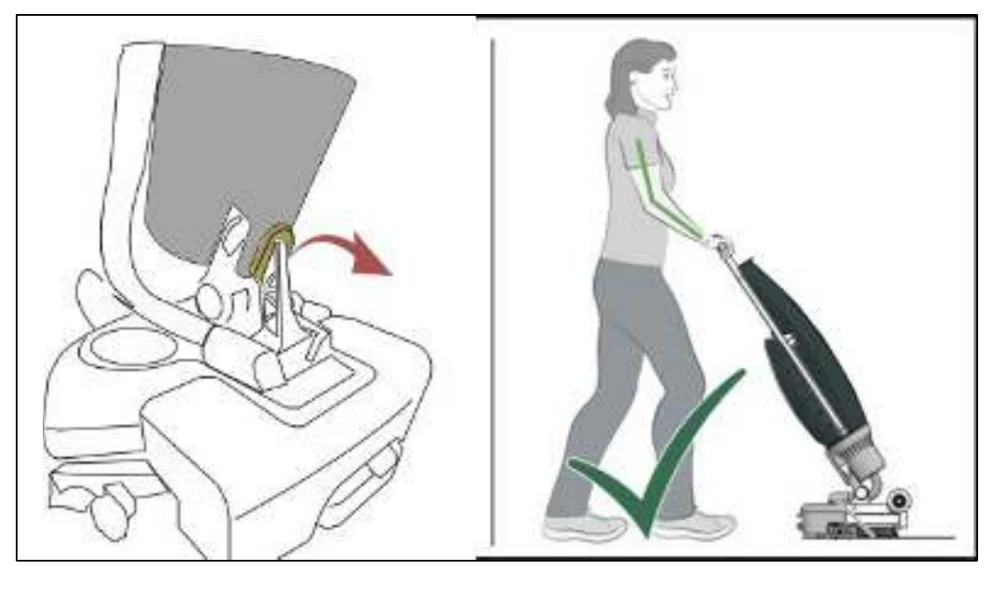
Two drawings. On the left, a close-up of the machine's parking and driving support with an arrow showing the support being swung into position. On the right, a woman walking upright and pushing the i-mop Lite with her arm shown in green, marked with a green check mark.
Source: Tennant i-mop Lite Operator Manual 9030350 Rev. 03 (02/2025), page 26, used with permission. SES ref PF-664G-KYBT‌‌​⁠⁠‍‍⁠​‍‍​​⁠‌⁠​​​‍​​​​​‌‍‍​​​‌​⁠​​​‍‌​‌‍⁠⁠​‍⁠‍‍⁠‌⁠‌​⁠‌⁠⁠‍​
i-mop Lite 9030350 (03 (02/2025))Page 26 of 38
OPERATION

6.2.3 ECO mode

In short ECO mode lowers the amount of cleaning solution used. You switch it on and off with the ECO button, and a separate button starts normal cleaning mode.‌‌​⁠⁠‍‍⁠​‍‍​​⁠‌⁠​​​‍​​​​​‌‍⁠​​​‌​⁠​​​‌‌⁠⁠⁠‌‌‍‌‌‍‌​‍‌‌⁠‍⁠⁠​⁠‍

The ECO mode will use 40% less cleaning solution.‌‌​⁠⁠‍‍⁠​‍‍​​⁠‌⁠​​​‍​​​​​‌‍⁠​​​‌​⁠​​​‌‌⁠⁠⁠‌‌‍‌‌‍‌​‍‌‌⁠‍⁠⁠​⁠‍

  1. Turn on the ECO mode by pushing the ECO button (Figure 19, pos 1).
  2. Turn off ECO mode by pushing the ECO mode again.
  3. To start normal cleaning mode push button (Figure 19,pos2)
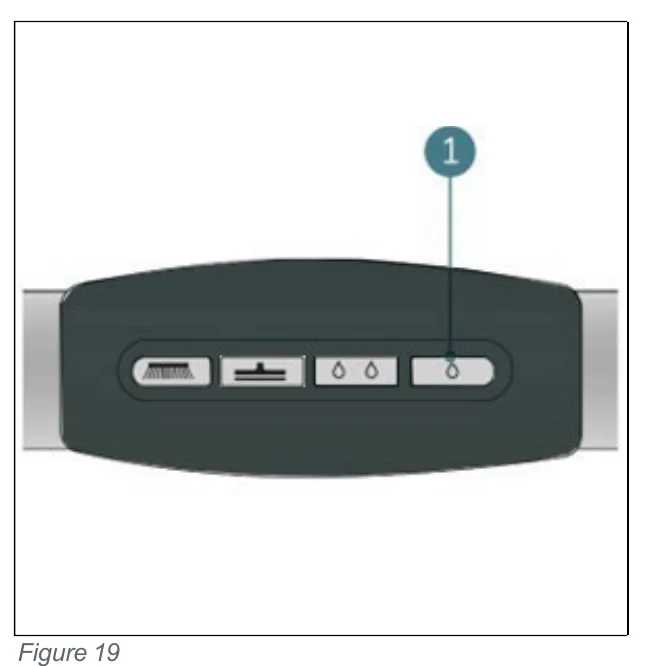
Top view of the control panel on the handle with four buttons in a row; callout 1 points to the rightmost button, the ECO button
Figure 19

6.2.4 Turning off the i-mop® Lite

In short Releasing the trigger stops the machine automatically, though the vacuum motor keeps running for about 3 more seconds. Afterwards the machine goes into store position.

Releasing the trigger (Figure 20, pos 1) will automatically stop the i-mop® Lite.

Note that the vacuum motor will continue to run for approximately 3 more seconds.

Put the i-mop® Lite in store position, see section 4.2.
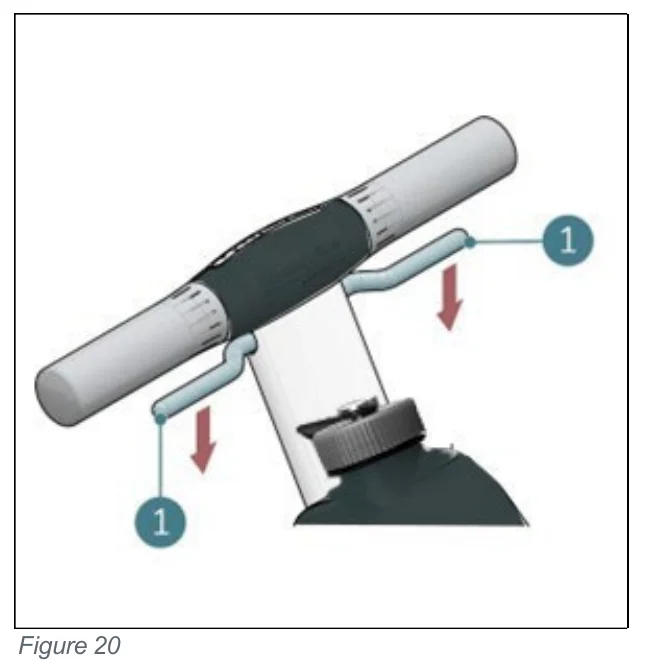
Handle of the i-mop Lite with two trigger levers marked with callouts 1, and red arrows showing the levers being released downward
Figure 20

6.2.5 Emptying tanks

In short Both tanks are emptied into an appropriate drain. The recovery tank is emptied each time the cleaning solution tank is filled.

Dispose of water or cleaning solution from both tanks in an appropriate drain. Even though the recovery tank is bigger, empty it each time the cleaning solution tank is filled.

WARNING Please observe the local provisions regarding solution disposal related to wastewater treatment.
Source: Tennant i-mop Lite Operator Manual 9030350 Rev. 03 (02/2025), page 27, used with permission. SES ref PF-MF55-IYWE‌‌​⁠⁠‍‍⁠​‍‍​​⁠‌⁠​​​‍​​​​​‌‍⁠​​​‌​⁠​​​‌‌⁠⁠⁠‌‌‍‌‌‍‌​‍‌‌⁠‍⁠⁠​⁠‍
i-mop Lite 9030350 (03 (02/2025))Page 27 of 38
Cleaning and storage

6.3. Cleaning and storage

6.3.1 Flushing the system

In short This section explains how to flush the system so no solution is left in the lines and valves. You refill the solution tank with clean water, press the Brush and Cleaning solution and Vacuum buttons, and run the machine with the trigger.‌‌​⁠⁠‍‍⁠​‍‍​​⁠‌⁠​​​‍​​​​​‌⁠​​​​‌​⁠​​‌⁠‍​⁠​⁠⁠‌​​‍⁠‌⁠‍‍‍​​‍​⁠⁠

Be sure to flush the tanks out completely to discard any remaining solution in the lines and valves:‌‌​⁠⁠‍‍⁠​‍‍​​⁠‌⁠​​​‍​​​​​‌⁠​​​​‌​⁠​​‌⁠‍​⁠​⁠⁠‌​​‍⁠‌⁠‍‍‍​​‍​⁠⁠

  1. Refill the solution tank with 2 to 4 cups / 0.5 to 1 liter of clean water.
  2. Press the Brush and Cleaning solution and Vacuum buttons on the control panel.
  3. Use the trigger to start the i-mop® Lite and allow it to flush the system.
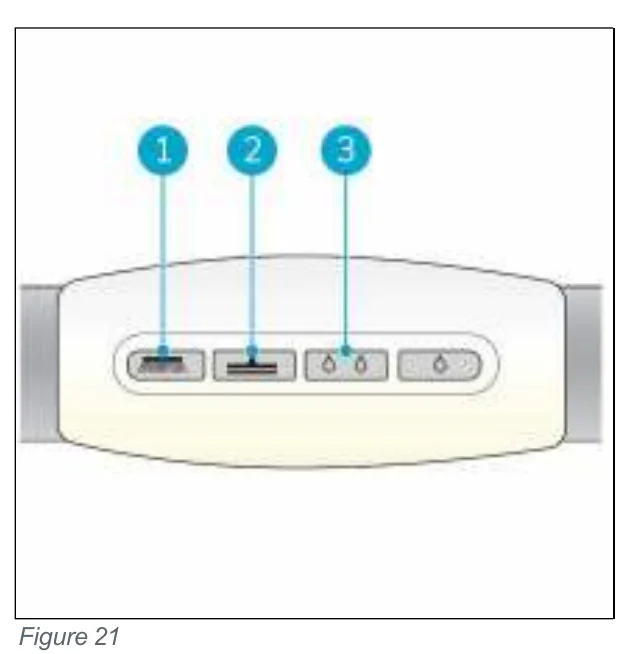
Control panel buttons on the handle of the i-mop Lite, with callouts 1, 2 and 3 pointing to the first, second and third buttons in the row of four
Figure 21

6.3.2 Cleaning the tanks

  1. Dispose of water or cleaning solution from both tanks in an appropriate drain.
  2. To clean the recovery tank thoroughly:
    • Partially fill the tank with fresh water and hold it horizontally with the holes facing up.
    • Tilt the tank repeatedly, thoroughly rinsing all the dirt and debris out from the tank.
  3. To clean the solution tank, follow the same procedure.
TIP: Dry the tanks
Slightly open both tank caps before storage to allow the tanks to dry.
Source: Tennant i-mop Lite Operator Manual 9030350 Rev. 03 (02/2025), page 28, used with permission. SES ref PF-2VIC-D7C7‌‌​⁠⁠‍‍⁠​‍‍​​⁠‌⁠​​​‍​​​​​‌⁠​​​​‌​⁠​​‌⁠‍​⁠​⁠⁠‌​​‍⁠‌⁠‍‍‍​​‍​⁠⁠
i-mop Lite 9030350 (03 (02/2025))Page 28 of 38
MAINTENANCE

6.3.3 Cleaning the filter

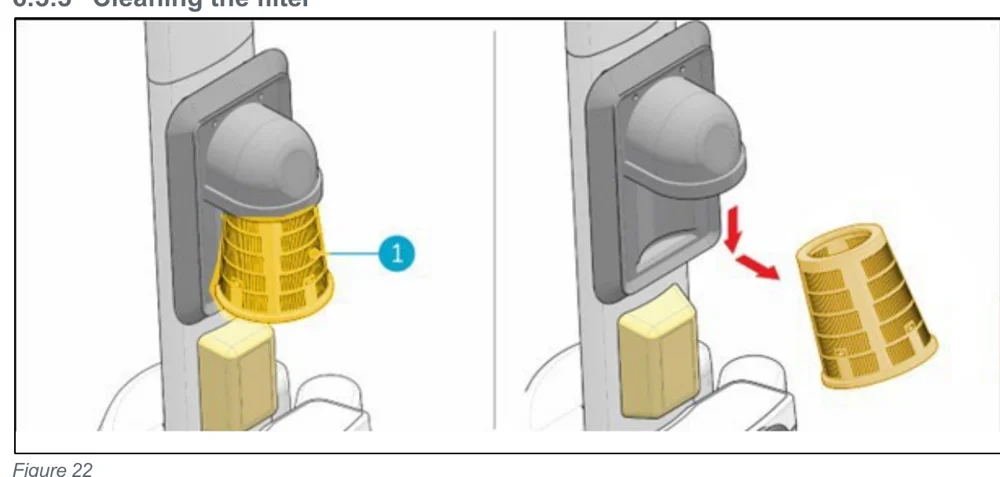
In short This procedure explains how to clean the yellow suction filter. Put the machine in store position, remove the recovery tank, take out and clean the filter, put it back in the rubber holder, and refit the recovery tank.‌‌​⁠⁠‍‍⁠​‍‍​​⁠‌⁠​​​‍​​​​​‌⁠‌​​​‌​⁠​​‍‍​​‍‍⁠‌​​‌‌⁠‍​‌⁠​‌‌⁠‍​​
Two views of the machine's suction filter area. Left: the yellow suction filter fitted beneath the rubber holder, with callout 1 pointing to the filter. Right: the filter pulled out and away from the holder, with red arrows showing the direction of removal.
Figure 22
  1. Put the i-mop® Lite in store position, see section 4.2.
  2. Remove the recovery tank.
  3. Release the yellow suction filter (Figure 22, pos 1) from beneath the rubber holder by tilting it slightly and pulling it out.
  4. Clean the filter.
  5. Place the filter back in the rubber holder. First push it into position 2 and than press it inwards.
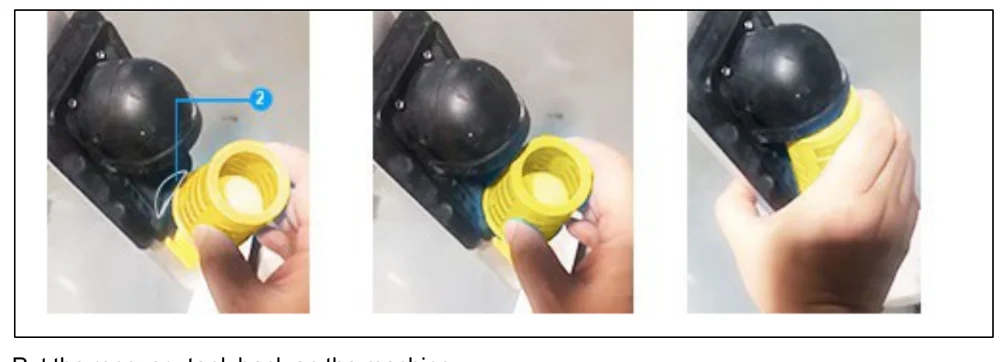
Three photos of a hand fitting the yellow suction filter into the rubber holder: first pushing it into position 2 (callout 2), then pressing it inwards until it is seated.
  1. Put the recovery tank back on the machine.
Source: Tennant i-mop Lite Operator Manual 9030350 Rev. 03 (02/2025), page 29, used with permission. SES ref PF-Q4XB-RILY‌‌​⁠⁠‍‍⁠​‍‍​​⁠‌⁠​​​‍​​​​​‌⁠‌​​​‌​⁠​​‍‍​​‍‍⁠‌​​‌‌⁠‍​‌⁠​‌‌⁠‍​​
i-mop Lite 9030350 (03 (02/2025))Page 29 of 38
MAINTENANCE

6.3.4 Removing the battery

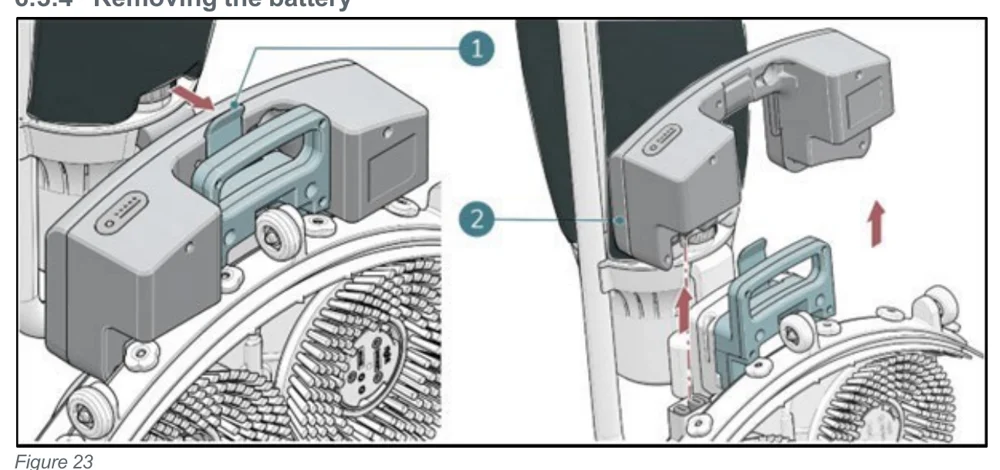
In short This section shows how to take the battery out of the machine: put the machine in store position, hold the scrub deck, press the retaining clip and pull the battery away. It also says to store an unused battery charged, in a dry, clean place.‌‌​⁠⁠‍‍⁠​‍‍​​⁠‌⁠​​​‍​​​​​‌⁠‍​​​‌​⁠​​​​​​‍​⁠⁠​⁠​​​‌‍‌‌⁠‌‌⁠​⁠‌
Two views of the battery on the i-mop Lite. Left: a red arrow points at the retaining clip on the battery handle, marked with callout 1. Right: the battery lifted up and away from its anchor above the scrub deck, with red arrows showing the lift direction, marked with callout 2.
Figure 23
  1. Put the i-mop® Lite in store position, see section 4.2.
  2. Hold the i-mop® Lite by the scrub deck to stabilize.
  3. Press the retaining clip inwards (Figure 23, pos 1)Battery will lift from its anchor, pull the battery away (Figure 23,pos 2).
  4. When the i-mop® Lite isn't used regularly, store the charged battery in a dry, clean place.
  5. Make sure the battery is charged monthly.

6.3.5 Checking the brushes and squeegee

In short This section covers checking that both brushes and the squeegee are clean and intact. Clean them with fresh water or replace them when needed.
  1. Check to see if both brushes are clean and intact, see section 7.1 for removal instructions.
  • Clean them under fresh water or replace them if necessary.
  • Replace brushes if the yellow wear indicator is the same height as other bristles.
  1. Check to see if the squeegee is clean and intact, see section 7.2 for removal instructions.
  • Clean it with fresh water and wipe it with a clean, damp cloth.
  • Replace the squeegee blades when necessary.
Source: Tennant i-mop Lite Operator Manual 9030350 Rev. 03 (02/2025), page 30, used with permission. SES ref PF-7YA6-GYL7‌‌​⁠⁠‍‍⁠​‍‍​​⁠‌⁠​​​‍​​​​​‌⁠‍​​​‌​⁠​​​​​​‍​⁠⁠​⁠​​​‌‍‌‌⁠‌‌⁠​⁠‌
i-mop Lite 9030350 (03 (02/2025))Page 30 of 38
OPERATION

6.3.6 Store in an upright position

In short This section explains how to store the i-mop® Lite standing upright. Put it in store position and place it close to a wall, with the handle toward the wall and the brushes facing away from it.‌‌​⁠⁠‍‍⁠​‍‍​​⁠‌⁠​​​‍​​​​​‌⁠⁠​​​‌​⁠​​​​‌⁠​​⁠⁠‍‌​⁠​⁠​⁠⁠‍‌‍⁠⁠‌‌
  1. Please ensure that the i-mop® Lite is stored in a place where nobody can bump into it.
  2. Put the i-mop® Lite in store position, see section 4.2.
  3. Store the i-mop® Lite close to a wall (Figure 24, pos 1) with the handle pointing towards the wall and the brushes facing away from the wall.
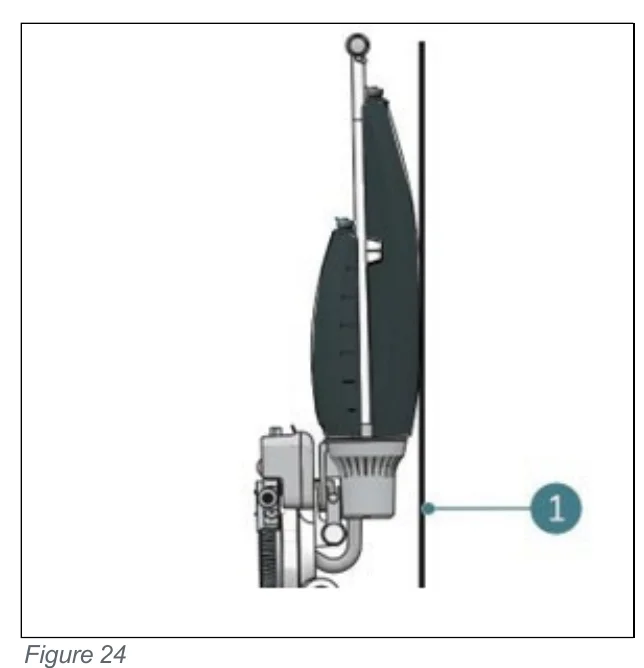
Side view of the i-mop Lite standing upright next to a wall, with the handle toward the wall and the brushes at the bottom facing away from it; callout 1 points to the wall
Figure 24
Source: Tennant i-mop Lite Operator Manual 9030350 Rev. 03 (02/2025), page 31, used with permission. SES ref PF-P2IQ-5POO‌‌​⁠⁠‍‍⁠​‍‍​​⁠‌⁠​​​‍​​​​​‌⁠⁠​​​‌​⁠​​​​‌⁠​​⁠⁠‍‌​⁠​⁠​⁠⁠‍‌‍⁠⁠‌‌
i-mop Lite 9030350 (03 (02/2025))Page 31 of 38
Maintenance

7. Maintenance

CAUTION Remove the battery before executing any cleaning or maintenance task.
CAUTION Always keep the body of the i-mop® Lite in an upright position when replacing the brushes or the squeegee.

7.1. Brush replacement

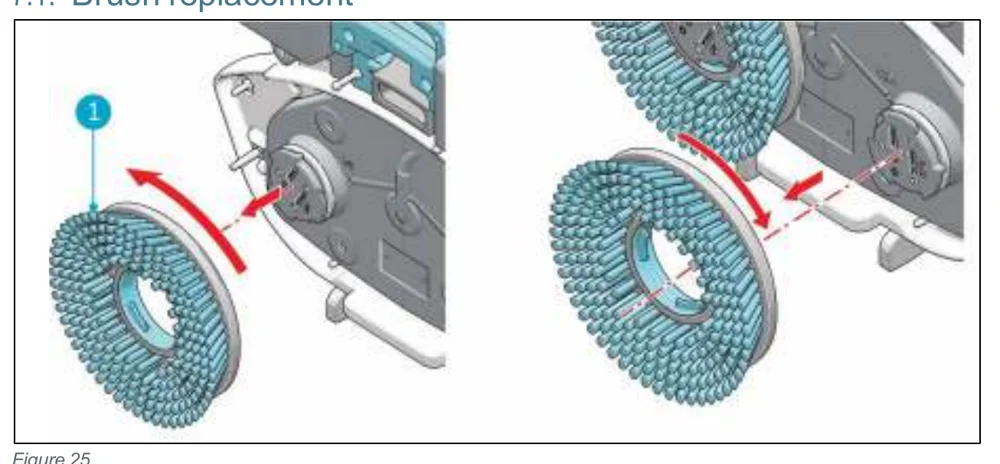
In short The brushes attach to the scrub deck with a bayonet fitting. Put the machine in store position, turn each brush until it catches the motor disk, pull it off, then inspect and clean the motor disks and scrub deck.‌‌​⁠⁠‍‍⁠​‍‍​​⁠‌⁠​​​‍​​​​​‍​​​​​‌​⁠​​​‍‍​​​​​‌‌​⁠‌‌‌‌​‍​‍‌‍⁠⁠
Two views of a brush being removed from the scrub deck motor disk. Left view: the left brush, marked with callout 1, is turned anticlockwise (red curved arrow) and pulled off along the dashed axis. Right view: the right brush is turned clockwise (red curved arrow) and pulled off toward the viewer.
Figure 25

The brushes are attached to the scrub deck with a bayonet fitting.‌‌​⁠⁠‍‍⁠​‍‍​​⁠‌⁠​​​‍​​​​​‍​​​​​‌​⁠​​​‍‍​​​​​‌‌​⁠‌‌‌‌​‍​‍‌‍⁠⁠

  1. Put the i-mop® Lite in store position, see section 4.2.
  2. Hold the scrub deck firmly with one hand.
  3. Using your other hand to turn the left brush (Figure 25, pos 1) anticlockwise until you feel resistance or see the motor disk turning as well.
  4. Pull the brush towards you, off the motor disk.
  5. Turn the right brush clockwise until you feel resistance or see the motor disk turning as well.
  6. Pull the brush towards you, off the motor disk.
  7. Visually inspect the motor disks.
  8. Clean the i-mop® Lite scrub deck with a clean, dry cloth before you install the brushes.
Source: Tennant i-mop Lite Operator Manual 9030350 Rev. 03 (02/2025), page 32, used with permission. SES ref PF-H3QX-Q2AH‌‌​⁠⁠‍‍⁠​‍‍​​⁠‌⁠​​​‍​​​​​‍​​​​​‌​⁠​​​‍‍​​​​​‌‌​⁠‌‌‌‌​‍​‍‌‍⁠⁠
i-mop Lite 9030350 (03 (02/2025))Page 32 of 38
MAINTENANCE

7.2. Squeegee replacement

In short The squeegee blades wear out over time and should be replaced when the floor is no longer dried properly. Detach the squeegee from the scrub deck, then flip the blades once and replace them with a new set the second time.‌‌​⁠⁠‍‍⁠​‍‍​​⁠‌⁠​​​‍​​​​​‍​‌​​​‌​⁠​​⁠⁠⁠​⁠⁠‌‍‍​​‌‌‍‍‌⁠​‌​⁠​‌‌

The squeegee blades come in pairs and wear out over time. When you notice the floor is no longer being dried properly, replace the squeegee blades.‌‌​⁠⁠‍‍⁠​‍‍​​⁠‌⁠​​​‍​​​​​‍​‌​​​‌​⁠​​⁠⁠⁠​⁠⁠‌‍‍​​‌‌‍‍‌⁠​‌​⁠​‌‌

7.2.1 Detaching the squeegee

  1. Put the i-mop® Lite in store position, see section 4.2.
  2. Hold the scrub deck firmly with one hand.
  3. Pull on the left side of the squeegee (Figure 26, pos 1) to remove it.
  4. Pull on the right side of the squeegee to remove it.
  5. Remove the vacuum hose from the squeegee by twisting the hose.
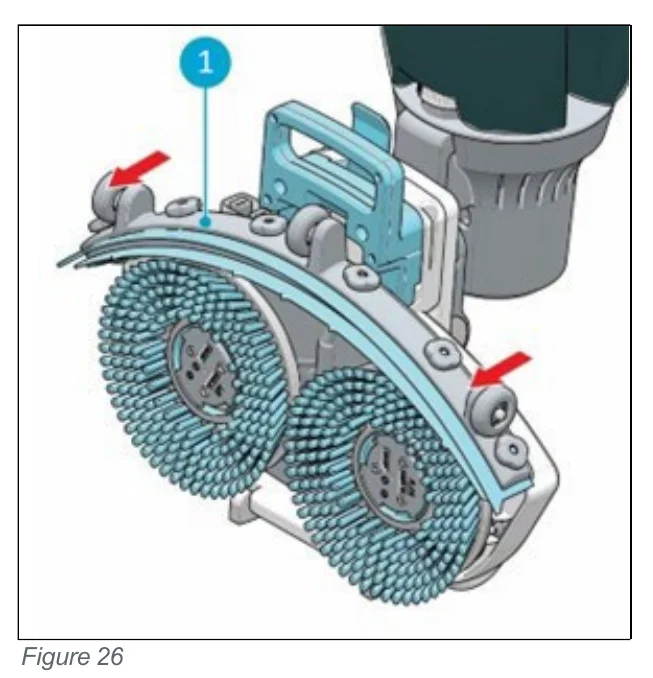
Scrub deck seen from the back with the curved squeegee, callout 1 pointing to the squeegee, and red arrows at the left and right ends showing where to pull to detach it; two round blue brushes sit below and the vacuum hose connection is above
Figure 26

7.2.2 Flipping/replacing the squeegee blade

  1. Unscrew the 6 plastic nuts on the back.
  2. Take off the squeegee rear plate.
  3. Once the plastic part is removed, you can easily take off the rear rubber blade.
  4. Push the 6 screws through the front blade in order to remove the squeegee front plate.
  5. Take off the rear rubber blade.
  6. Inspect the front and rear rubber blades:
    • The first time: flip the blades so the top of the blade is now facing the floor. Push the front plate screws through the holes.
    • The second time: attach a new set of blades. Push the front plate screws through the holes.
CAUTION The special squeegee blades that contain small arrow-like shapes cannot be switched. These need to be replaced every time.
  1. Put back the plastic rear plate.
  2. Screw the 6 plastic nuts on the back.
Source: Tennant i-mop Lite Operator Manual 9030350 Rev. 03 (02/2025), page 33, used with permission. SES ref PF-WD7G-7JAZ‌‌​⁠⁠‍‍⁠​‍‍​​⁠‌⁠​​​‍​​​​​‍​‌​​​‌​⁠​​⁠⁠⁠​⁠⁠‌‍‍​​‌‌‍‍‌⁠​‌​⁠​‌‌
i-mop Lite 9030350 (03 (02/2025))Page 33 of 38
MAINTENANCE

7.2.3 Attaching the squeegee

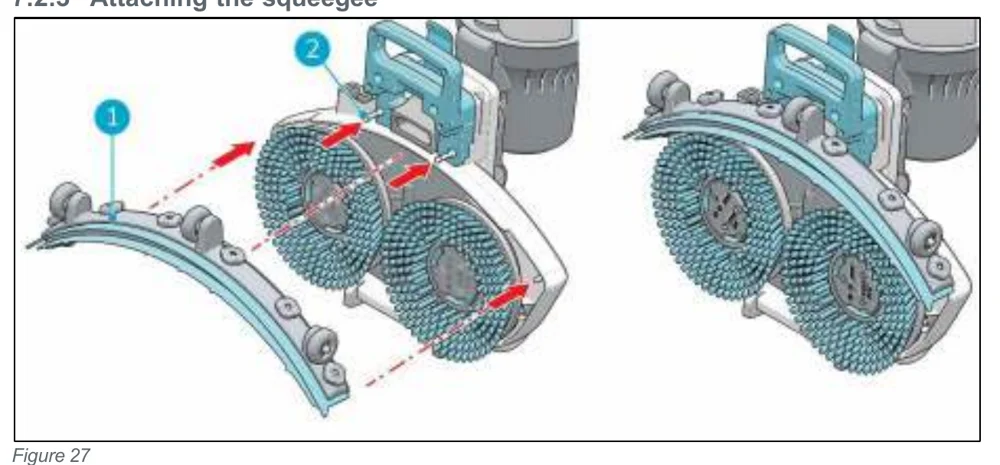
In short This part explains how to attach the squeegee to the scrub deck by lining up the pins and holes and pushing each side into place.‌‌​⁠⁠‍‍⁠​‍‍​​⁠‌⁠​​​‍​​​​​‍​‍​​​‌​⁠​​‍​‍‍​​‍‌⁠⁠⁠‌⁠⁠‌‌‍⁠​‌‌‍⁠‌
Two views of the scrub deck with two round brushes. On the left the curved squeegee is pulled away from the deck, with red arrows and dashed lines showing it moving toward the deck; callout 1 marks the holes on the squeegee and callout 2 marks the pins on the scrub deck. On the right the squeegee is attached to the deck.
Figure 27

To attach the squeegee:‌‌​⁠⁠‍‍⁠​‍‍​​⁠‌⁠​​​‍​​​​​‍​‍​​​‌​⁠​​‍​‍‍​​‍‌⁠⁠⁠‌⁠⁠‌‌‍⁠​‌‌‍⁠‌

  1. Hold the scrub deck firmly with one hand.
  2. Align the pins on the scrub deck (Figure 27, pos 2) with the holes on the squeegee (Figure 27, pos 1).
  3. Push the left side of the squeegee in place.
  4. Push the right side of the squeegee in place.

7.3. Recommended additional cleaning

In short The exterior of the machine should be cleaned weekly with a mild cleaner or damp cloth. The brushes are removed to clean the scrub deck.

Clean the exterior of the i-mop® Lite weekly with a non-abrasive, non-solvent cleaner or a clean, damp cloth. To clean the scrub deck, remove the brushes.

7.4. Recommended service time

In short Service is done by one of the service partners. The first service is recommended after 200 hours, then a full service every 500 hours.

Service must be done by one of our service partners. The first service is recommended after 200 hours. It is recommended to schedule a full service every 500 hours.

7.5. Accessories

In short The machine can use different brushes and polishing pads, but only experienced and trained operators may use them because some pads can damage the floor if used incorrectly.

The i-mop® Lite can be equipped with different brushes and polishing pads. The use of these accessories is only allowed by experienced and trained operators as some polishing pads can be abrasive and can cause damage to the floor surface when applied incorrectly. For more information please contact our sales department, or the partner who provided the i-mop® Lite.

Source: Tennant i-mop Lite Operator Manual 9030350 Rev. 03 (02/2025), page 34, used with permission. SES ref PF-IEQS-AZGT‌‌​⁠⁠‍‍⁠​‍‍​​⁠‌⁠​​​‍​​​​​‍​‍​​​‌​⁠​​‍​‍‍​​‍‌⁠⁠⁠‌⁠⁠‌‌‍⁠​‌‌‍⁠‌
i-mop Lite 9030350 (03 (02/2025))Page 34 of 38
Troubleshooting

8. Troubleshooting

In short This table lists common problems (no power, insufficient or no water flow, poor water recovery, leakage, battery or charger not charging), their likely causes and what to do about each. Some solutions are simple checks or part replacements, and others say to request service.‌‌​⁠⁠‍‍⁠​‍‍​​⁠‌⁠​​​‍​​​​​‍​⁠​​​‌​⁠​​‌‍⁠⁠​‌⁠​‌​​​​‍​‍​⁠‌‍‌⁠⁠​

Batteries and chargers: make sure your charger is compatible with your batteries, and set its charging algorithm to your battery pack before you use it.

ProblemCauseSolution
No powerNo batteryInsert battery
Empty batteryCharge battery
Battery incorrectly placedRemove and reinstall battery
Insufficient/no water flowWrong programCheck the operating mode on the control panel
Eco mode onCheck the ECO mode light on the control panel
Empty tankFill the tank
Tank incorrectly placedThe tank valve must be clicked on the nipple to open the seal, replace the tank
Filter blockedEnsure the solution tank has no dirt particles and the filter is clean
Blocked water pipeRequest for service
Poor water recoverySqueegee opening blockedRemove the pipe and clean the squeegee opening
Tears in squeegee bladesReplace squeegee blades
Filter blockedCheck the yellow filter and clean if necessary
Vacuum hose blockedCheck and remove blockage
Vacuum pump not runningRequest for service
LeakageTanks incorrectly placedCheck and reattach fluid tanks
Tear in vacuum hoseReplace vacuum hose or request for service
Battery not chargingBattery is at end of lifeReplace battery
Charger not chargingRequest service
Source: Tennant i-mop Lite Operator Manual 9030350 Rev. 03 (02/2025), page 35, used with permission. SES ref PF-XFAL-BIMP‌‌​⁠⁠‍‍⁠​‍‍​​⁠‌⁠​​​‍​​​​​‍​⁠​​​‌​⁠​​‌‍⁠⁠​‌⁠​‌​​​​‍​‍​⁠‌‍‌⁠⁠​
i-mop Lite 9030350 (03 (02/2025))Page 35 of 38
DECOMMISSIONING AND DISPOSAL

9. Decommissioning and disposal

In short The owner is responsible for disposing of the i-mop Lite responsibly, following local laws and regulations for recycling electrical equipment. Before disposal, flush the machine, remove the battery and remove loose components.‌‌​⁠⁠‍‍⁠​‍‍​​⁠‌⁠​​​‍​​​​​‍‌​​​​‌​⁠​​‌‍​‍‌​⁠‍​‍‍​‌⁠⁠​​​⁠⁠‌‍‌‍
ATTENTION It is the responsibility of the i-mop® Lite owner to dispose of the product responsibly.

After decommissioning, the i-mop® Lite still contains valuable resources and needs to be disposed of according to your local laws and regulations regarding recycling of electrical equipment.‌‌​⁠⁠‍‍⁠​‍‍​​⁠‌⁠​​​‍​​​​​‍‌​​​​‌​⁠​​‌‍​‍‌​⁠‍​‍‍​‌⁠⁠​​​⁠⁠‌‍‌‍

Three disposal symbols in a row: a crossed-out wheeled waste bin, the recycling arrows symbol, and a round blue RECYCLE badge with the phone number 1.800.822.8837

Before disposal please:

  1. Flush the machine, see section 6.3.1.
  2. Remove the battery for separate disposal, see section 6.3.4.
  3. Remove all loose components like brushes, tanks and squeegee.
  4. Dispose all items according to your local laws and regulations.
Source: Tennant i-mop Lite Operator Manual 9030350 Rev. 03 (02/2025), page 36, used with permission. SES ref PF-MV7K-KOM4‌‌​⁠⁠‍‍⁠​‍‍​​⁠‌⁠​​​‍​​​​​‍‌​​​​‌​⁠​​‌‍​‍‌​⁠‍​‍‍​‌⁠⁠​​​⁠⁠‌‍‌‍
i-mop Lite 9030350 (03 (02/2025))Page 36 of 38
BACK COVER

For North America/International:
Tennant Company
10400 Clean Street, Eden Prairie,
MN 55344-2650
Telephone: (800) 553-8033
Internet: www.tennantco.com‌‌​⁠⁠‍‍⁠​‍‍​​⁠‌⁠​​​‍​​​​​‍‌‍​​​‌​⁠​​‌⁠​‍​‍​‍​‌⁠‍‌‍‌‌​⁠‍‌​‍⁠​

For EMEA region:
Tennant N.V.
Industrielaan 6 5405 AB
P.O. Box 6 5400 AA, Uden -The Netherlands
Europe@tennantco.com

Source: Tennant i-mop Lite Operator Manual 9030350 Rev. 03 (02/2025), page 38, used with permission. SES ref PF-5RMA-EVU4‌‌​⁠⁠‍‍⁠​‍‍​​⁠‌⁠​​​‍​​​​​‍‌‍​​​‌​⁠​​‌⁠​‍​‍​‍​‌⁠‍‌‍‌‌​⁠‍‌​‍⁠​
i-mop Lite 9030350 (03 (02/2025))Page 38 of 38

Tennant and Nobles are trademarks of Tennant Company. Southeastern Equipment & Supply is an independent dealer.


Not Sure Which Machine Fits Your Floors?

Talk to a real SES tech about new, demo or certified reconditioned options, parts and service.

© 2026 Southeastern Equipment and Supply, Inc. All Rights Reserved.

Visa Discover AMEX Mastercard